Cloudways promo code ZOOM is our exclusive code for 80% off your first two Cloudways invoices (up to $200 off per month) for new customers. We typed it into the real Cloudways signup form and got “Promo code applied successfully”.
Disclosure: PromoCode.Sale may earn a commission when you sign up through our links, at no extra cost to you.

80% Off Your First 2 Months
Cloudways Promo Code: up to $200 off per month on your first two invoices, all managed cloud hosting plans.
Cloudways Promo Code Details
Here is everything about the Cloudways promo code in one table. The code is ours alone: Cloudways created it for PromoCode.Sale, and it works for anyone who signs up as a new Cloudways customer.
| Main code | ZOOM |
| Discount | 80% off your first 2 invoices |
| Maximum saving | $200 off per month (up to $400 in total) |
| Who can use it | New Cloudways customers only |
| Where you enter it | Cloudways signup form, “I have a promo code” |
| Plans covered | Hosting plans, AI agents, AI website builder and add-ons billed on those invoices |
| Countries | No country limit |
| Backup codes | BOND, KPON, DLY1 to DLY10 (same offer) |
| Status | Accepted by the Cloudways signup form in our latest test |
The Cloudways discount code is not a one-time coupon on a checkout page. Cloudways bills by the hour and sends one invoice a month, so the 80% comes off the first two of those monthly invoices.
What the Cloudways Promo Code Saves on Each Plan
The easiest way to see the value of the Cloudways promo code is in dollars. We took the Flexible plan prices from the official Cloudways pricing page and applied the 80% discount to two full months on each plan.
| Flexible plan | Normal price | With ZOOM | Saved in 2 months |
|---|---|---|---|
| Micro (1GB RAM, 25GB) | $14/mo | $2.80/mo | $22.40 |
| Small (2GB RAM, 50GB) | $28/mo | $5.60/mo | $44.80 |
| Medium (4GB RAM, 80GB) | $54/mo | $10.80/mo | $86.40 |
| Large (8GB RAM, 160GB) | $99/mo | $19.80/mo | $158.40 |
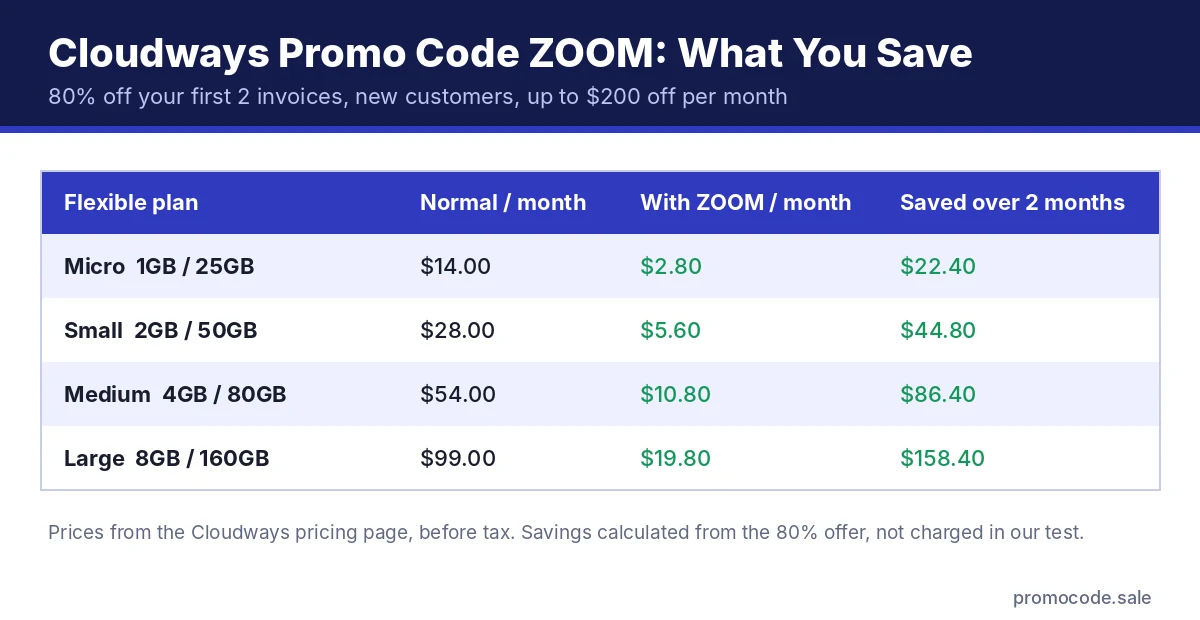
These numbers are calculated from the published prices and the 80% offer. We did not pay a Cloudways invoice in our test, so treat them as the expected saving before tax. If you run more than one server, the discount applies to the whole invoice, up to $200 off per month.
How to Use the Cloudways Promo Code at Signup
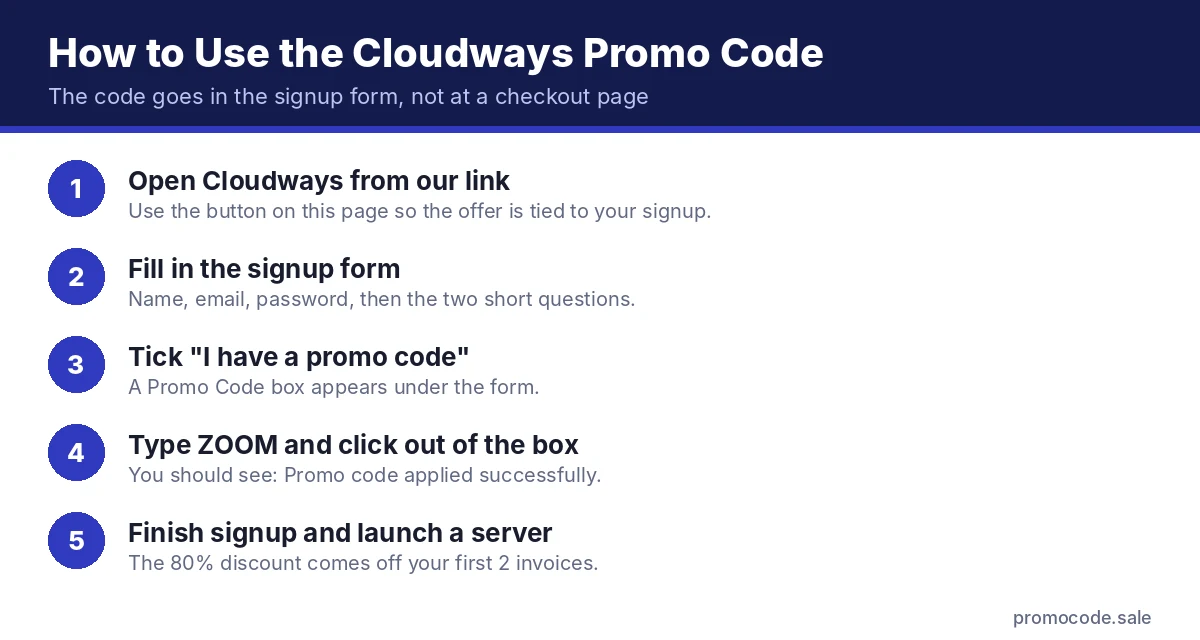
Most hosting companies ask for a coupon at checkout. Cloudways is different: the Cloudways promo code goes in the signup form, before you even launch a server. If you skip it there, there is no checkout page later where you can add it.
- Open Cloudways from our link. Use the Cloudways signup button on this page.
- Fill in the form. Enter your first name, last name, email and a password, then answer the two short questions about your role and monthly hosting spend.
- Tick “I have a promo code”. A Promo Code box appears just under the questions.
- Type ZOOM and click outside the box. The form checks the code right away and shows “Promo code applied successfully” with a green tick.
- Accept the terms and sign up. Then launch your first server. The discount is applied to your first two invoices.
Our Signup Test: Which Cloudways Codes Were Accepted
We opened the real Cloudways signup page, ticked “I have a promo code” and typed each of our codes one by one. Every time, we waited for the form to check the code before moving on.
| Code | Result | Message |
|---|---|---|
| ZOOM | Accepted | Promo code applied successfully |
| BOND | Accepted | Promo code applied successfully |
| KPON | Accepted | Promo code applied successfully |
| DLY1 to DLY10 | Accepted | All ten applied successfully |
| A made-up code | Rejected | Promo code is invalid |
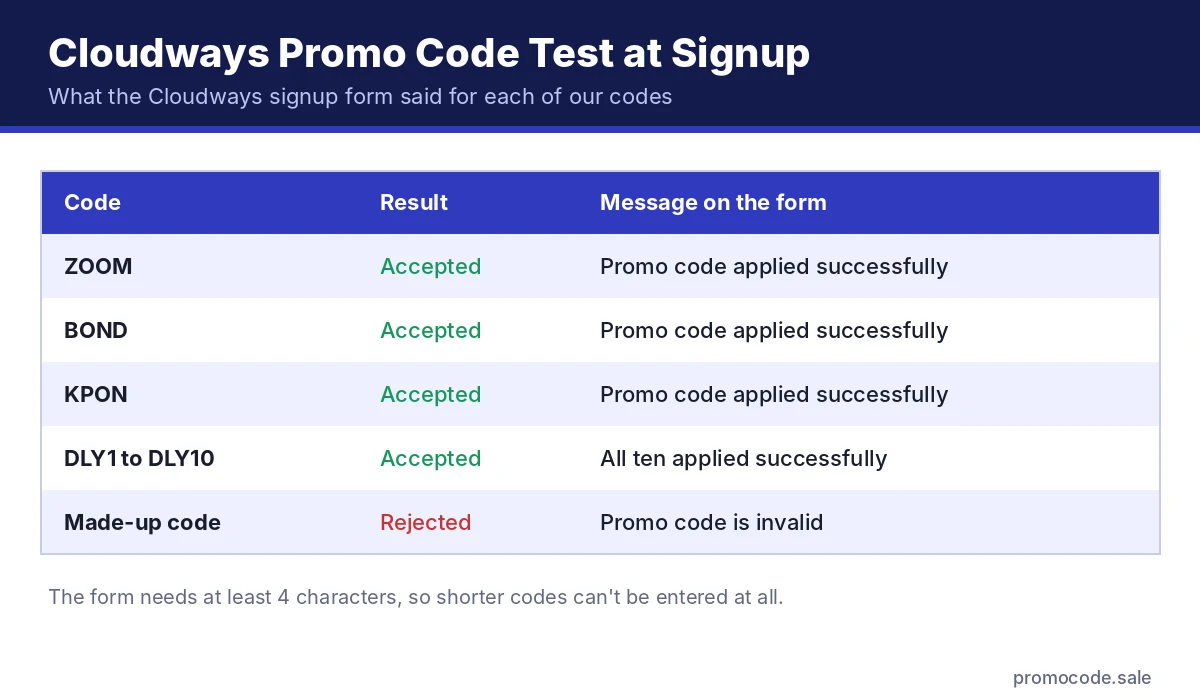
The made-up code matters: it proves the form really checks each code instead of showing a green tick for anything. We also learned that the box needs at least four characters, so a shorter code can’t be entered at all.
The signup form confirms the code but does not show the discount amount. The 80% figure, the two-invoice limit and the $200 monthly cap come from the offer Cloudways set for our code.
Watch: Our Cloudways Videos
Prefer to watch? These short videos from our YouTube channel show the Cloudways promo code and why people switch to managed cloud hosting.
Cloudways Plans and Prices Before the Discount
Cloudways sells managed hosting on top of cloud servers. On the Flexible plans you pick the server size, and Cloudways handles setup, security, caching and support. These are the four entry sizes on the pricing page:
| Plan | RAM | CPU | Storage | Bandwidth | Price |
|---|---|---|---|---|---|
| Micro | 1GB | 1 vCPU | 25GB NVMe | 1TB | $14/mo |
| Small | 2GB | 1 vCPU | 50GB NVMe | 2TB | $28/mo |
| Medium | 4GB | 2 vCPU | 80GB NVMe | 4TB | $54/mo |
| Large | 8GB | 4 vCPU | 160GB NVMe | 5TB | $99/mo |
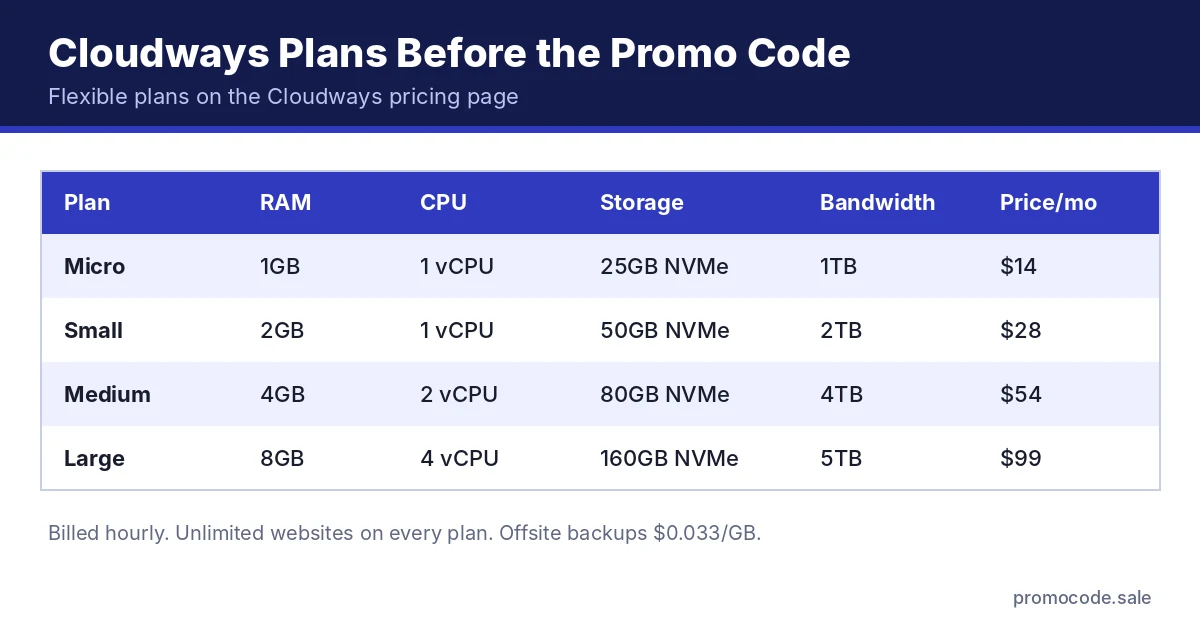
Every plan allows unlimited websites and unlimited visits. Free SSL, a built-in firewall, Redis and Object Cache Pro, staging and free migration are included. Offsite backup storage is extra at $0.033 per GB, and prices exclude tax.
Which Cloudways Plan Should You Pick?
The Cloudways coupon gives the same 80% on every size, so pick the plan you really need, not the one that looks cheapest after the discount. After two months you pay the full price.
- Micro ($14): one blog, a portfolio or a small business site with modest traffic.
- Small ($28): a growing WordPress site, or two or three small sites on one server.
- Medium ($54): a WooCommerce store or a busy content site. Cloudways marks it as the most popular choice.
- Large ($99): bigger stores, agencies hosting many client sites, or resource-hungry apps.
Because Cloudways uses vertical scaling, you can start small and resize the server later. That makes the first two discounted months a cheap way to find the right size: watch the CPU and RAM graphs, then scale up or down.
How Cloudways Billing Works
Knowing how Cloudways bills helps you get the most from the discount. Cloudways charges by the hour for each running server. On the pricing page, Micro is listed at $0.0208 an hour, which adds up to $14 for a full month.
Invoices are issued once a month, on the 1st, for the usage of the previous month. That has two effects on the discount:
- If you sign up in the middle of a month, your first invoice covers only part of a month. The 80% still applies, but the money saved is smaller.
- Your second invoice covers the first full month, so that is where most of the saving shows up.
If you want the full value of both discounted invoices, launch your real server early and keep it running, instead of testing for a few days and deleting it.
The $200 Monthly Cap Explained
The Cloudways discount code takes 80% off, but never more than $200 off a single invoice. For most people the cap never matters: 80% of $250 is exactly $200, so you only hit the limit when one invoice is above $250.
| Invoice before discount | 80% would be | You actually save | You pay |
|---|---|---|---|
| $54 | $43.20 | $43.20 | $10.80 |
| $250 | $200 | $200 | $50 |
| $400 | $320 | $200 (cap) | $200 |
So the biggest possible saving is $400 over the two invoices.
Free Trial and the Promo Code
Cloudways Flexible comes with a free trial with no credit card needed. The trial and the Cloudways promo code do different jobs: the trial lets you build and test a server for free, and the code cuts the price once you become a paying customer.
The promo code is entered at signup, which is also when your trial starts. So add ZOOM to the signup form even if you only plan to try Cloudways first. When you upgrade to a paid account, the discount is waiting on your first invoices.
Note that the trial does not include AWS or Google Cloud servers. You can still choose those after you upgrade.
Free Migration Within Two Months
If you are moving an existing site, Cloudways offers free migration. Under this offer, migrations must be requested within two months, which lines up with the two discounted invoices.
The smart order is: sign up with the Cloudways promo code, launch the server size you need, then request the migration in your first weeks. That way your site is live on Cloudways while you are still paying 80% less, and you have time to check speed before the full price starts.
Tips to Get the Most From the Discount
- Enter the code at signup. There is no later checkout page, so this is the only moment to add it.
- Wait for the green tick. Click out of the box and wait a second or two for “Promo code applied successfully”.
- Use a new email. The offer is for new customers. An email already linked to a Cloudways account will not qualify.
- Launch early in the month. Hourly billing means a full month on the discount saves more than a few days.
- Turn off unused servers. A forgotten test server keeps billing after the two discounted invoices end.
- Check the add-ons. Extra services such as the CDN or offsite backups are billed on the same invoice.
About Cloudways
Cloudways is a managed cloud hosting platform owned by DigitalOcean. Instead of giving you a raw server to configure, it sets up and maintains the server for you, so you can host WordPress, WooCommerce, Magento, Laravel and PHP apps without managing Linux yourself.
You can choose servers from several cloud providers, including DigitalOcean, Vultr, Linode, AWS and Google Cloud, in many data center locations. Cloudways adds its own stack for speed, a firewall, automated backups, staging, and support around the clock.
Cloudways has become a popular step up from shared hosting for site owners who want more speed and control. You can see all its codes on our Cloudways store page.
Cloudways Reviews on Trustpilot
Before you sign up, it helps to know what customers say. On Cloudways’ Trustpilot page the company has a TrustScore of 4.6 out of 5 from 3,766 reviews, and it replies to all of its negative reviews.
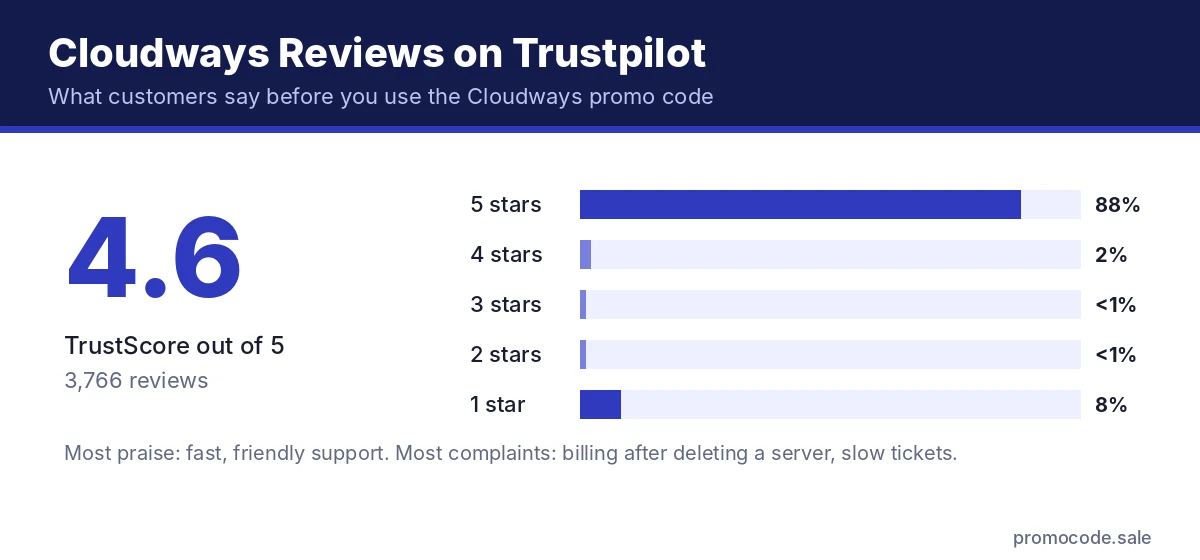
Around 88% of reviews give five stars. Many name individual support agents who fixed caching issues, activated accounts quickly or helped with migrations. About 8% are one-star reviews. The repeated complaints are slow or generic replies on some tickets, and billing that continued for add-ons after a server was deleted.
Our takeaway: support is the main reason people stay, and billing is worth checking. When you finish testing, delete servers and add-ons you no longer need.
Pros and Cons
- 80% off two invoices with the Cloudways promo code
- Choice of five cloud providers
- Unlimited websites on every plan
- Free migration, SSL, caching and staging
- Hourly billing and easy scaling
- Strong support reviews
- No email hosting included
- Offsite backups cost extra
- Pricier than basic shared hosting after the discount ends
- The code only works at signup, for new customers
- AWS and Google Cloud are not in the free trial
Cloudways Promo Code Not Working?
If the Cloudways promo code shows a red mark instead of a green tick, check these in order:
- Typing: enter ZOOM in capitals with no spaces before or after.
- Wait: the form checks the code online. Click outside the box and wait a couple of seconds.
- Too many tries: if you test many codes quickly, Cloudways may show a “Verify you are human” check and reject codes until you complete it.
- Existing account: the offer is for new customers only.
- Box missing: tick “I have a promo code” first.
- Still stuck: try a backup code such as BOND or KPON, or contact Cloudways support before you finish signup.
Terms and Conditions
- 80% off the first two invoices only.
- Maximum $200 off per month.
- For new Cloudways customers only.
- Covers hosting plans, AI agents, the AI website builder and add-ons on those invoices.
- Migrations under this offer must be requested within two months.
- The code must be entered in the signup form.
- Cloudways can change or end the offer; full prices apply after the two discounted invoices.
Backup Codes With the Same Offer
ZOOM is our main code, but Cloudways gave us backup codes with the same offer. All of them were accepted by the signup form in our test. Use one if ZOOM ever gives you trouble.
Only one code can be used per account, and they all give the same 80% off two invoices. There is no reason to look for a “better” one.
Cloudways vs Shared Hosting
Shared hosting is cheaper on paper, often a few dollars a month, because hundreds of sites share one server. Cloudways gives your sites their own cloud server with dedicated RAM and CPU.
| Shared hosting | Cloudways | |
|---|---|---|
| Server | Shared with many sites | Your own cloud server |
| Scaling | Change plan | Resize the server in a few clicks |
| Billing | Yearly upfront, often | Hourly, invoiced monthly |
| Best for | Very small sites | Growing sites and stores |
With ZOOM, the first two months of a Micro server cost $2.80 each, close to shared hosting prices. Find more hosting offers in our web hosting category.
How We Tested Our Codes
We opened Cloudways through our own link, went to the signup page and ticked “I have a promo code”. We entered ZOOM, BOND, KPON and DLY1 to DLY10, then a made-up code as a control, and recorded the message for each one.
We did not create an account or pay an invoice, so the savings tables are calculated from the published prices and the offer terms, not from a real bill. We re-test our Cloudways codes regularly and update this page when anything changes.
Cloudways Promo Code FAQ
What is the best Cloudways promo code?
ZOOM is our exclusive Cloudways promo code. It gives 80% off your first two invoices, up to $200 off per month, for new customers.
Where do I enter the Cloudways promo code?
In the signup form. Tick “I have a promo code”, type ZOOM in the box, and wait for “Promo code applied successfully”.
Does the Cloudways discount code work for existing customers?
No. The offer is for new Cloudways customers only, so it must be added when you create a new account.
How much can I save with the Cloudways promo code?
Up to $200 per invoice and $400 in total. On the $14 Micro plan you would pay $2.80 a month for two months.
Does the Cloudways coupon work on all plans?
Yes. It covers hosting plans, AI agents, the AI website builder and add-ons billed on your first two invoices.
Can I use the Cloudways promo code with the free trial?
Yes. Add the code at signup, when your trial starts. The discount applies to your first paid invoices.
Can I add the promo code after I sign up?
There is no checkout page later, so add it during signup. If you forgot, contact Cloudways support before your first invoice.
Why does my Cloudways promo code show an error?
Check the spelling, wait for the online check, and avoid testing many codes quickly, which can trigger a human check. You can also try BOND or KPON.
Is the free migration included?
Yes, Cloudways offers free migration, and under this offer it must be requested within two months of signing up.

No Comments
Leave Comment