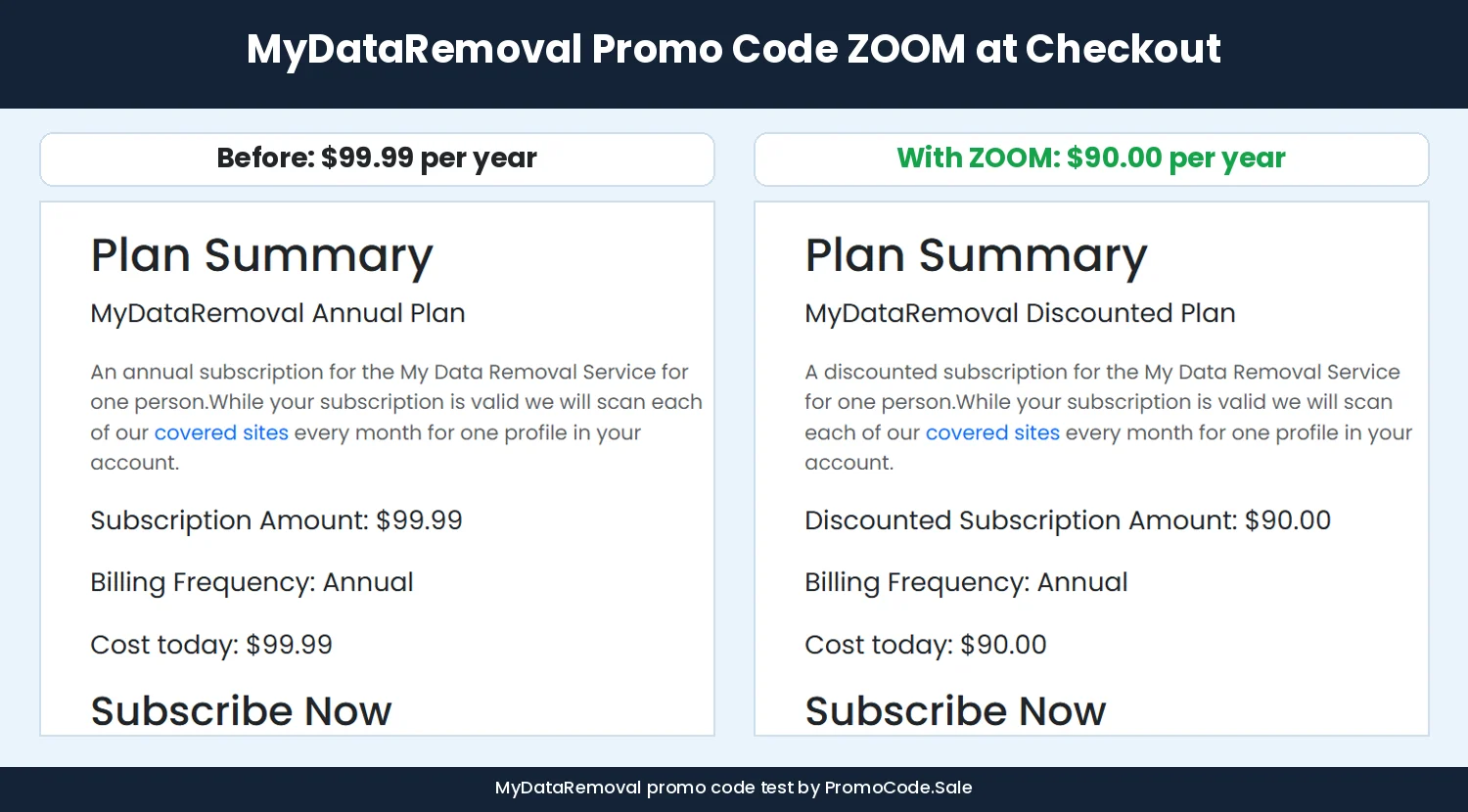
MyDataRemoval promo code ZOOM takes $9.99 off every Standard annual plan at mydataremoval.com. In our latest checkout test, the one-person plan dropped from $99.99 to $90.00, the two-person plan from $169.99 to $160.00, and the family plan from $249.99 to $240.00.
Disclosure: PromoCode.Sale tests every code at checkout before we publish it. The store links on this page go straight to mydataremoval.com.
MyDataRemoval · Privacy & Data Removal
MyDataRemoval Promo Code
$9.99 OFF every Standard annual plan
MyDataRemoval Promo Code Details
Here is everything you need to know about our MyDataRemoval promo code before you open the checkout. We applied it to every plan the site sells, so the table below shows what really happened in the cart, not what a banner promised.
| Item | Details |
|---|---|
| Code | ZOOM |
| Discount | $9.99 off the yearly price (shown as about $10 off) |
| Works on | Standard annual plans for 1 person, 2 people and families of up to 6 |
| Does not work on | Standard monthly ($9.99 a month) and Premium ($499 a year) |
| Who can use it | New customers in the United States |
| Where to enter it | “Have a promo code?” box on the Plan Summary page |
| Status | Verified & Working in our latest test |
| Backup codes | BOND, KPON, FNN and ASD give the same $9.99 off |
The discount is a fixed dollar amount, not a percentage. That means the saving is the same $9.99 whether you protect one person or a whole family. The plan name in the summary changes to “Discounted Plan” when the code is accepted, which is an easy way to confirm it worked.
What You Save With the MyDataRemoval Promo Code
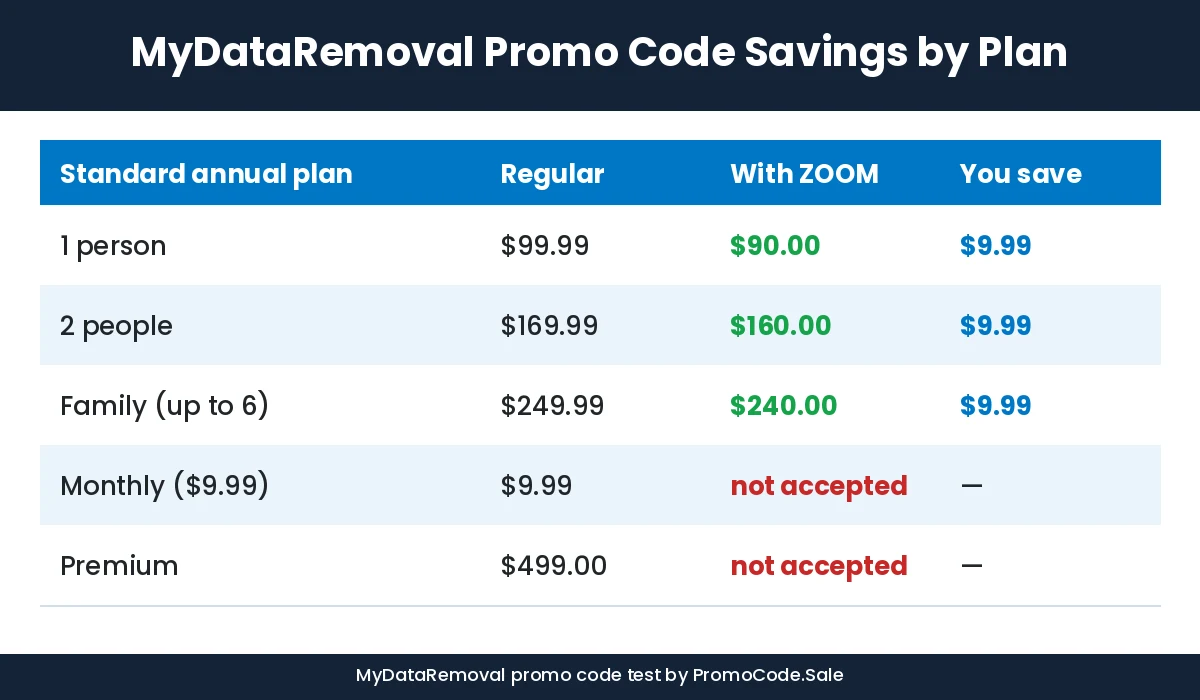
We opened each plan on mydataremoval.com, clicked Next, typed ZOOM into the promo box and wrote down the “Cost today” figure. These are the real numbers from that test.
| Standard annual plan | Regular price | With ZOOM | You save |
|---|---|---|---|
| 1 person | $99.99 | $90.00 | $9.99 |
| 2 people | $169.99 | $160.00 | $9.99 |
| Family (up to 6) | $249.99 | $240.00 | $9.99 |
| Monthly, 1 person | $9.99 a month | Not accepted | — |
| Premium, 1 person | $499.00 | Not accepted | — |
The biggest win is for people who were about to pay monthly. Twelve months at $9.99 costs $119.88. The annual plan with our MyDataRemoval promo code costs $90.00, so switching to yearly billing and using ZOOM saves $29.88 in the first year.
How to Use the MyDataRemoval Promo Code
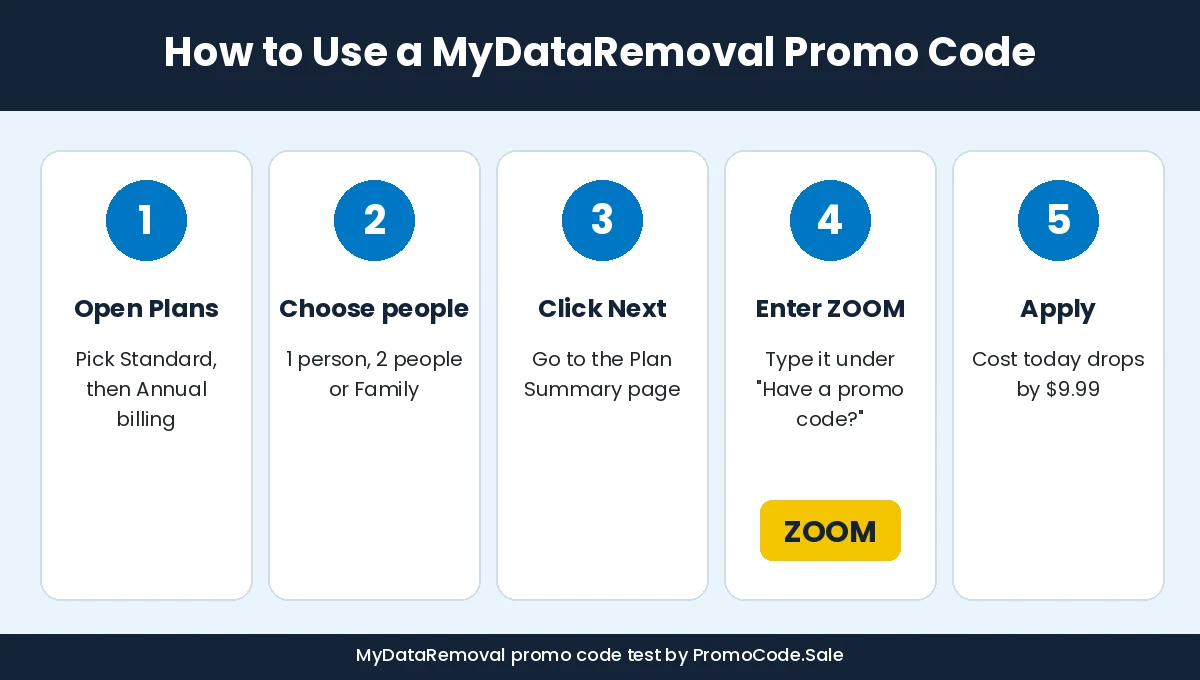
The code box is not on the pricing page. It only shows up after you pick a plan, so follow these steps in order.
- Copy ZOOM. Use the Copy Code button at the top of this page.
- Open the plans page. Go to mydataremoval.com/plans and click Start Protection under Standard.
- Keep Annual selected. Billing frequency must be Annual, or the code will be rejected.
- Choose who is covered. Pick 1 (Solo), 2, or Family, then click Next.
- Enter the code. On the Plan Summary page, scroll to “Have a promo code?”, paste ZOOM and click Apply Promo Code.
- Check the total. “Cost today” should drop by $9.99 and the plan name should say “Discounted Plan”. Then click Continue to Payment.
Which Plans Accept the MyDataRemoval Discount Code
We tried the code on all five plan types. It worked on the three Standard annual options and failed on the other two, each time with a clear message from the site.
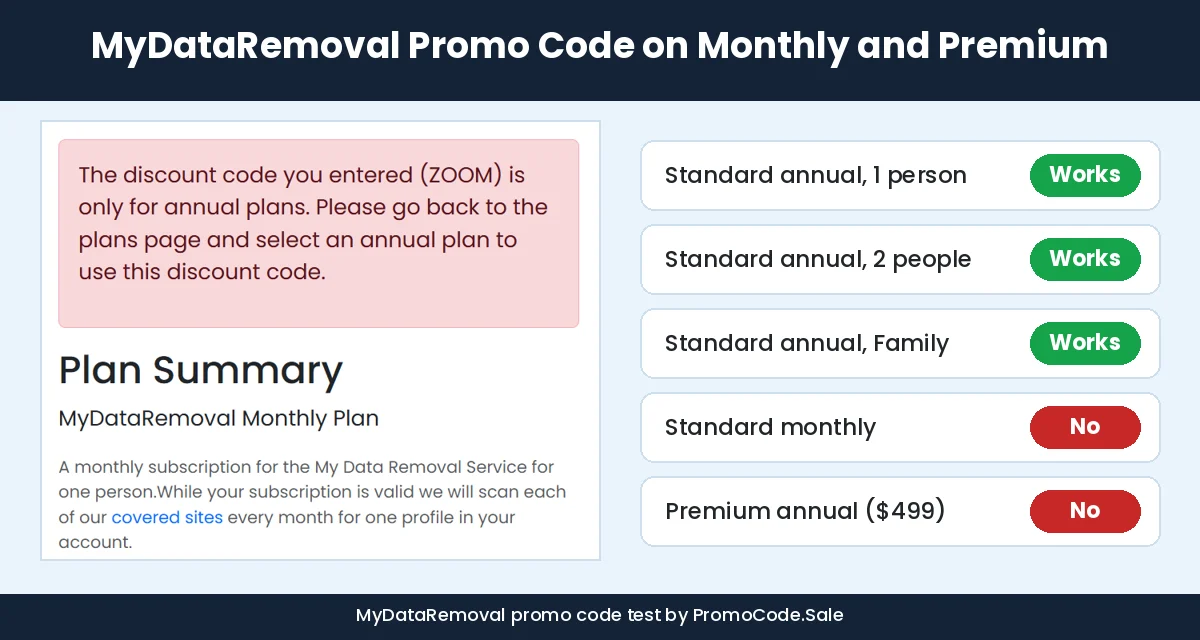
- Standard monthly: the site said the code is only for annual plans and asked us to go back and pick an annual plan.
- Premium: the site said the code does not work with Premium plans. The price stayed at $499.00.
- Made-up code: we also typed a fake code as a control. It was rejected and the price did not change, so the drop with ZOOM is real.
Using the MyDataRemoval Promo Code on the Family Plan
The family plan covers up to six people in one account, such as a spouse, children or parents. It already costs far less per person than separate plans, and the MyDataRemoval promo code takes another $9.99 off the yearly bill.
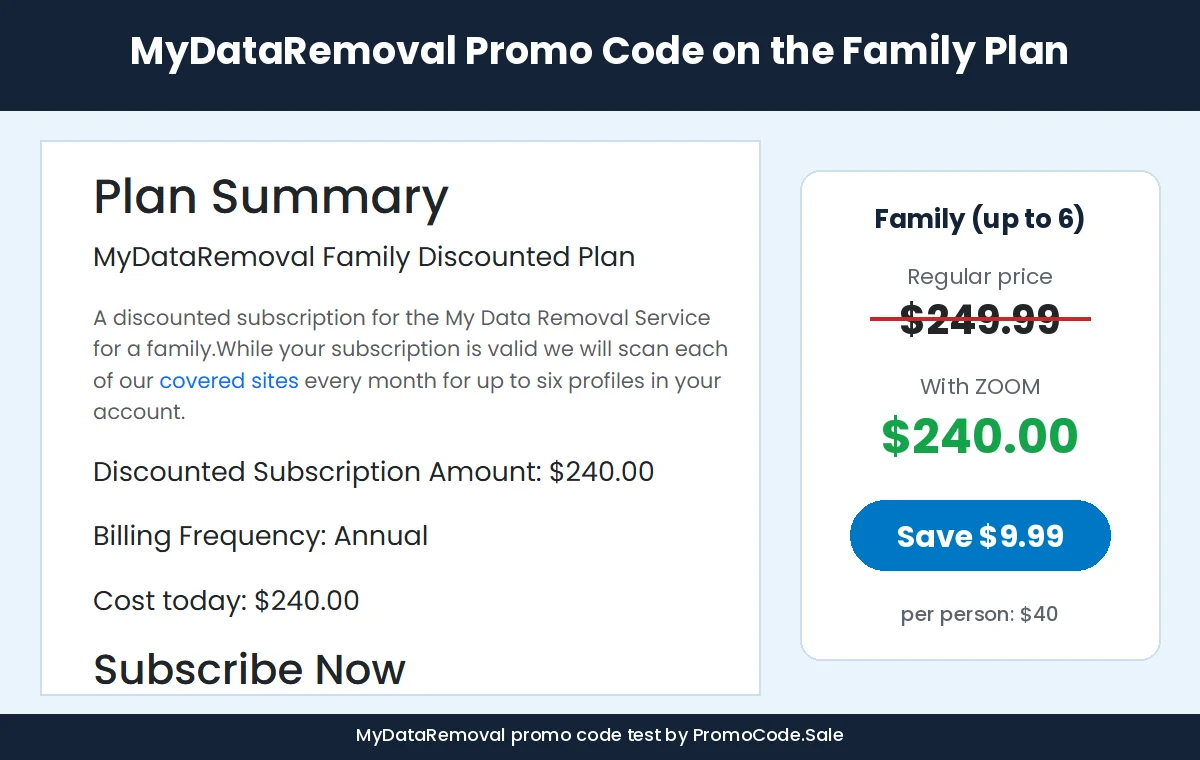
| Plan with ZOOM | Yearly total | Cost per person |
|---|---|---|
| 1 person | $90.00 | $90.00 |
| 2 people | $160.00 | $80.00 |
| Family, 6 people | $240.00 | $40.00 |
If you are covering three or more people, the family plan is the better buy even before the discount. Six separate one-person plans with the code would cost $540, while one family plan with the code costs $240.
Which MyDataRemoval Plan Should You Choose?
Free Scan
No card needed. It shows where your data appears, but it does not remove anything. Good for checking how exposed you are first.
Standard Annual
Removal from people search sites and major data brokers, monthly monitoring, do not call and do not mail lists, and up to 5 addresses per person. This is the plan our MyDataRemoval coupon works on.
Premium
Everything in Standard plus 22 premium sites that need extra work, extended monitoring, unlimited addresses and priority support. The code does not apply here.
For most people, Standard Annual with ZOOM is the best value. Premium makes sense if you have moved many times, want the harder premium sites covered, or need faster support. The monthly plan is the simplest to cancel, but it costs more over a year and cannot be discounted.
What MyDataRemoval Removes and Monitors
MyDataRemoval publishes a full list of covered sites. When we checked it, the list had 194 sites, and 22 of them were marked as premium only.
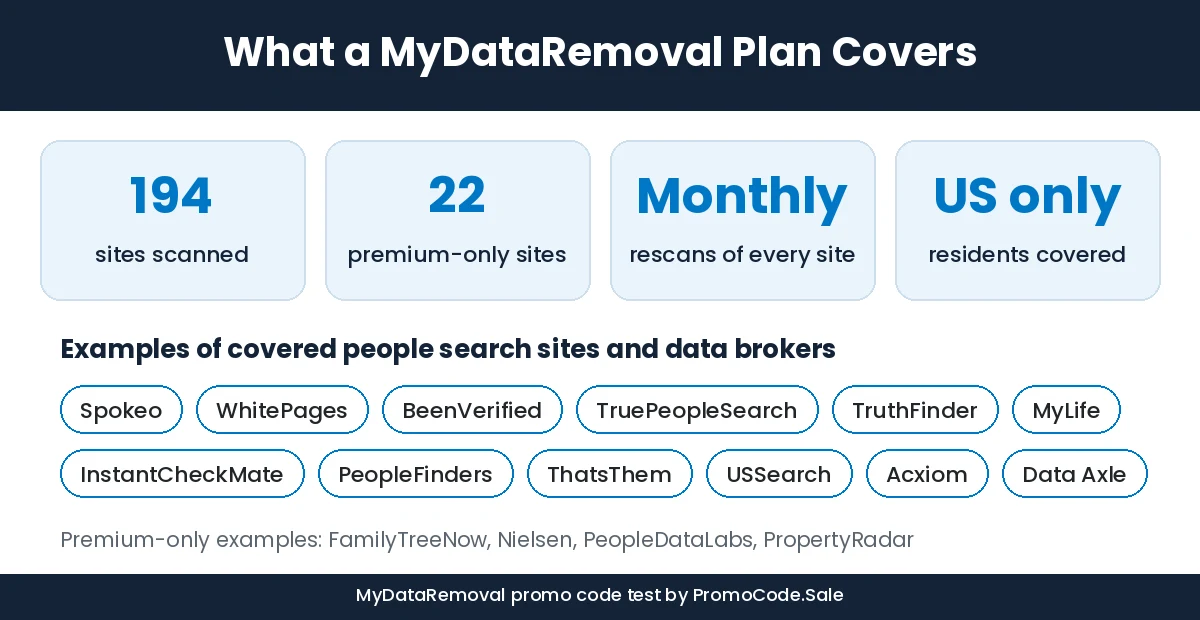
Well-known people search sites on the list include Spokeo, WhitePages, BeenVerified, TruePeopleSearch, TruthFinder, MyLife, InstantCheckMate, PeopleFinders, ThatsThem and USSearch. Large data brokers such as Acxiom and Data Axle are covered too. Premium-only examples include FamilyTreeNow, Nielsen, PeopleDataLabs and PropertyRadar.
The kinds of data these sites share include your full name, home address, age and date of birth, phone numbers, emails, property value, photos, family members and occupation.
How MyDataRemoval Works
According to the official How It Works page, the service runs in six steps:
- Sign up for a plan, and add family members to the same account if you want the discount for more people.
- Submit your details: the addresses, phone numbers and emails you have used. The company suggests going back five years.
- Search: a mix of people and software checks the covered sites for your data.
- Remove: MyDataRemoval sends removal requests to those sites for you.
- Report: you get reports showing which sites had your data and what was removed. You pick how often, such as monthly or quarterly.
- Repeat: every covered site is scanned again each month, including the ones already cleaned.
The FAQ says removal usually starts the same day you sign up, or within one or two business days when they are busy.
Why Data Removal Has to Be Ongoing
Data brokers keep collecting and selling information, so a profile you remove can show up again later. MyDataRemoval says this openly on its own site, and it is the reason the plans are subscriptions with monthly rescans rather than one-time jobs.
This also explains why the annual plan is the one to buy. A data removal service only pays off if it keeps checking for months. Paying yearly with our MyDataRemoval discount code keeps that protection running for 12 months at the lowest price we found on the site.
MyDataRemoval vs Doing It Yourself
You can remove yourself from people search sites by hand. MyDataRemoval even publishes a free DIY guide. Here is how the two options compare:
| Do it yourself | MyDataRemoval Standard + ZOOM | |
|---|---|---|
| Cost | Free | $90.00 a year for one person |
| Time | Many hours of forms, emails and checks | Done for you |
| Rechecks | You must repeat them yourself | Every site rescanned monthly |
| Reports | None | Reports on exposed and removed data |
| Do not call / mail lists | You sign up yourself | Added for you |
DIY makes sense if you only want to clear a few sites once. If you want 194 sites checked every month, the subscription saves a lot of time, and our MyDataRemoval promo code makes the first year cheaper.
MyDataRemoval Reviews on Trustpilot
MyDataRemoval has a TrustScore of 4.5 out of 5 on Trustpilot, but from only 17 reviews, and just 2 of them were posted in the last 12 months. Trustpilot notes that the company invites customers to leave reviews.
The positive reviews mention fast email replies, helpful answers to questions, and the relief of searching their own name and finding nothing. Because the number of reviews is small and many are older, we suggest running the free scan first to see the results for yourself before you pay.
Pros and Cons
Pros
- Free scan with no card
- 194 covered sites, published openly
- Monthly rescans and reports
- Family plan for up to 6 people
- Our code takes $9.99 off every annual plan
- US phone support on weekdays
Cons
- US residents only
- No refunds once work has started
- Code does not work on monthly or Premium
- Cannot remove social media posts
- Few Trustpilot reviews
MyDataRemoval Promo Code Not Working?
If the MyDataRemoval promo code does not lower your total, check these points:
- “Only for annual plans” message: you picked Monthly. Go back to the plans page, choose Annual and click Next again.
- “Does not work with premium plans” message: switch to Standard Plans on the plan details page.
- “Please reach out to customer support” message: the code was typed wrong. Type ZOOM in capital letters, with no spaces.
- No promo box: the box only appears on the Plan Summary page after you click Next.
- A different code was applied: a browser extension may have replaced it. Remove it, enter ZOOM again and check that “Discounted Plan” appears.
- Still stuck: try one of the backup codes, BOND, KPON, FNN or ASD, or call MyDataRemoval at (855) 700-2914.
MyDataRemoval Promo Code Terms
- One promo code per order. The code takes $9.99 off the first year of a Standard annual plan.
- The service is for US residents only. The covered sites usually do not hold data on people in other countries.
- Plans renew automatically until you cancel. Cancel from Dashboard, then Account Settings, then Cancel Subscription. Service runs until the end of the paid period.
- The FAQ says refunds are not given once work has started, so try the free scan first.
- Payment is by major credit cards or PayPal. Gift cards can be redeemed on the plan page.
- Prices and code terms are set by MyDataRemoval and can change. The “Cost today” line at checkout is the final price.
Full details are in the MyDataRemoval FAQ and terms.
Backup MyDataRemoval Discount Code Options
ZOOM is our main code, but we tested four more on the same plans. All of them gave exactly the same result.
| Code | 1 person annual | 2 people annual | Family annual |
|---|---|---|---|
| ZOOM | $90.00 | $160.00 | $240.00 |
| BOND | $90.00 | $160.00 | $240.00 |
| KPON | $90.00 | $160.00 | $240.00 |
| FNN | $90.00 | $160.00 | $240.00 |
| ASD | $90.00 | $160.00 | $240.00 |
The codes cannot be combined. Use one of them per order.
More Ways to Save on MyDataRemoval
- Pay yearly: annual billing plus ZOOM costs $29.88 less than 12 monthly payments.
- Group your household: two people cost $80 each with the code, and a family of six costs $40 each.
- Scan before you buy: the free scan shows whether your data is really out there.
- Start with Standard: you can upgrade to Premium later if the scan shows a lot of exposure on premium sites.
Who Should Use the MyDataRemoval Promo Code
The MyDataRemoval promo code is most useful for people who already know they want a full year of protection. These are the cases where we think it fits best:
Recent movers
A new address spreads to people search sites fast. Standard covers up to 5 addresses per person, so old and new homes can both be watched.
Couples
The two-person plan with our MyDataRemoval discount code costs $160.00 a year, or $80 each, and both profiles are rescanned every month.
Families
Parents who want their children and their own parents covered can protect up to six people for $240.00 a year with ZOOM.
Scam targets
If you get a lot of spam calls or phishing texts, removing your phone number and address from data brokers helps cut that over time.
If you only want to test the service for a month, the monthly plan is the safer choice, but remember the MyDataRemoval promo code cannot be used on it.
What Happens After You Pay
Once the payment goes through, you set up your profile in the MyDataRemoval dashboard. Add the names, addresses, phone numbers and emails you want searched. The more you add, the more listings the team can match. You also choose how often you want reports and whether they arrive by email or in your account.
The first search and removal requests usually begin the same day. Later reports show which sites had your data, exactly what each site showed, and which listings have been removed. Each month every covered site is checked again, so anything that comes back can be removed again. Your plan renews after 12 months at the regular price, so set a reminder if you want to look for a new MyDataRemoval promo code before the renewal date.
About MyDataRemoval
MyDataRemoval is a US privacy service based at 304 S Jones Blvd, Las Vegas, Nevada. It removes personal information from people search sites and data brokers, then keeps watching those sites for new listings. The company says it does not share or sell customer data except to remove your information, and it publishes a transparency report about its company and its sources of revenue.
Support is available by email at hello@mydataremoval.com or by phone at (855) 700-2914, Monday to Friday, 9am to 5pm Pacific time. Find more privacy offers in our Privacy & Security category or on the MyDataRemoval store page.
What MyDataRemoval Does Not Do
It is worth knowing the limits before you buy, so the MyDataRemoval coupon goes toward a service that fits what you need:
- It cannot remove posts or profiles from Facebook, YouTube or other social media, because that needs access to your accounts.
- It does not stop most physical junk mail. ValPack and a few others can be stopped.
- Spam calls, texts and emails will not stop right away. They should slowly drop as your data leaves circulation.
- For a few sites, such as Intelius, the covered sites list says MyDataRemoval sends you removal instructions instead of filing the request itself.
How We Test the MyDataRemoval Promo Code
We do not copy codes from other sites. We opened mydataremoval.com in Chrome, chose each plan (Standard annual for 1, 2 and family, Standard monthly and Premium), and applied ZOOM, BOND, KPON, FNN and ASD on the Plan Summary page. We wrote down the “Cost today” figure every time, and we tested a fake code to make sure the price only drops for real codes. We stop at the payment step and do not make a purchase. We re-test this MyDataRemoval promo code every month and update this page when anything changes.
MyDataRemoval Promo Code FAQ
Is there a working MyDataRemoval promo code?
Yes. ZOOM takes $9.99 off any Standard annual plan. In our test, the one-person plan dropped from $99.99 to $90.00.
Does the MyDataRemoval promo code work on the monthly plan?
No. The site says the code is only for annual plans. Choose Annual billing to use it.
Can I use the code on MyDataRemoval Premium?
No. The site says the code does not work with Premium plans, and the price stays at $499.
Does ZOOM work on the family plan?
Yes. The family plan for up to six people dropped from $249.99 to $240.00 with ZOOM.
Where do I enter a MyDataRemoval discount code?
Pick a plan, click Next, then type the code in the “Have a promo code?” box on the Plan Summary page and click Apply Promo Code.
Is MyDataRemoval available outside the US?
No. The service is for US residents only, because the covered sites rarely hold data on people in other countries.
Can I get a refund from MyDataRemoval?
The FAQ says refunds are not offered once work has started. You can contact the company if you are unhappy, and you can run the free scan before paying.
How fast does MyDataRemoval start removing my data?
Removal usually starts the same day you sign up, or within one or two business days when the team is busy.
How many sites does MyDataRemoval cover?
The covered sites list had 194 sites when we checked, with 22 of them covered only on Premium plans. Every site is rescanned monthly.


No Comments
Leave Comment