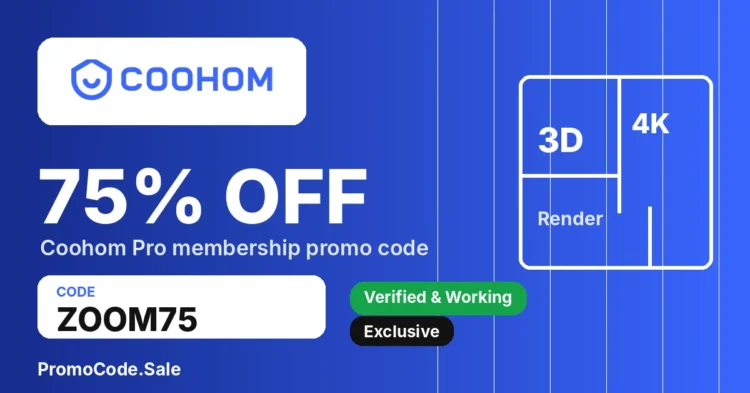
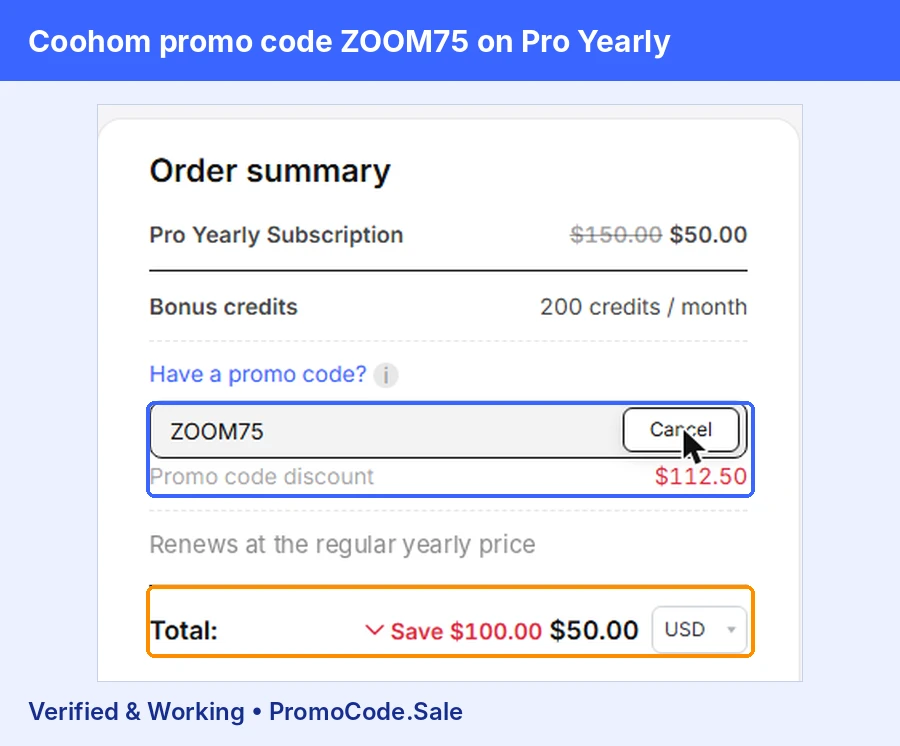
Coohom promo code ZOOM75 takes 75% off Coohom Pro memberships, yearly or monthly. We tested it at the real Coohom checkout in USD: on Pro Yearly it showed a $112.50 promo code discount (75% of $150), and on Pro Monthly a $11.25 discount (75% of $15).
Disclosure: PromoCode.Sale earns a commission when you buy Coohom through our links, at no extra cost to you. ZOOM75 is an exclusive code Coohom created for us.
 Coohom Promo Code
Coohom Pro membership, yearly or monthly. Tested by Mahmoud Hassan at the real checkout.
On this page
Coohom Promo Code Details
| Code | ZOOM75 |
| Discount | 75% off the regular Coohom Pro price |
| Plans | Coohom Pro Yearly and Pro Monthly (Elite is not included) |
| Who can use it | New and existing Coohom accounts |
| Where it works | Worldwide. We tested it in USD; the checkout also offers EGP and EUR |
| Max discount | No cap shown. On Pro Yearly the discount line was the full 75% ($112.50) |
| Status | Verified & Working in our latest test |
| Offer type | Exclusive promo code for PromoCode.Sale readers |
The Coohom promo code is entered in the Have a promo code? field of the Coohom order summary. It replaces any automatic account coupon, so only one code counts per order.
What You Save With the Coohom Promo Code
We logged in to a real Coohom account, opened the pricing page in USD and added Coohom Pro to the order summary. Here is what the Coohom promo code did on each plan:
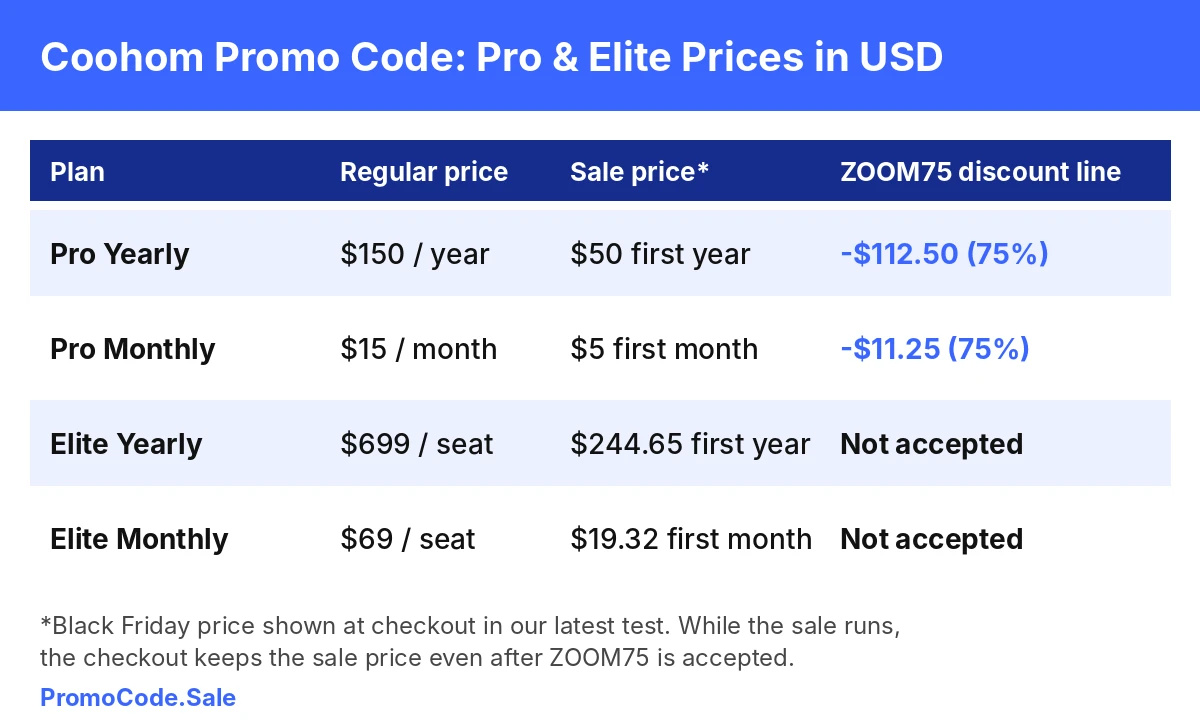
| Plan | Regular price | ZOOM75 discount line | Result |
|---|---|---|---|
| Pro Yearly | $150.00 / year | −$112.50 | Accepted |
| Pro Monthly | $15.00 / month | −$11.25 | Accepted |
| Elite Yearly / Monthly | $699 / $69 per seat | None | Not accepted |
On the regular price, 75% off Pro Yearly means you pay about $37.50 instead of $150 for the first year. That is the biggest saving we have seen on a Coohom membership through a code.
How to Use the Coohom Promo Code
- Copy ZOOM75. Click the button at the top of this page. It copies the Coohom promo code and opens Coohom in a new tab.
- Log in or sign up. Coohom asks you to sign in before checkout. A free Basic account is enough to start.
- Open Pricing and pick Pro. Choose Yearly or Monthly, then click Buy now & Save.
- Click “Have a promo code?” in the order summary, paste ZOOM75 and click Apply.
- Check the summary. A “Promo code discount” line appears in red. Compare the total before you pay.

If the order summary shows an automatic “Coupon 15% OFF”, that is a Coohom account offer. When you apply the Coohom promo code, it turns into “Unavailable coupon” because only one discount is used. Keep whichever gives the lower total.
Coohom Black Friday Sale
Coohom Black Friday is live. The pricing page shows “Black Friday Sales Started!” and up to 70% off yearly plans. In our latest test the checkout showed:
- Pro Yearly: $50 for the first year (regular $150), then $150 per year.
- Pro Monthly: $5 for the first month (regular $15).
- Elite Yearly: $244.65 for the first year per seat (regular $699).
- Elite Monthly: $19.32 for the first month per seat (regular $69).
During the sale, the Coohom promo code is accepted on Pro but the total stays at the sale price. If you are buying this week, the sale price is the deal; after the sale ends, ZOOM75 is the way to get 75% off Pro. See the Coohom Black Friday prices.
Coohom Pro Monthly Test
We also tested ZOOM75 on the monthly plan, for people who want to try Pro for a single project before committing to a year.
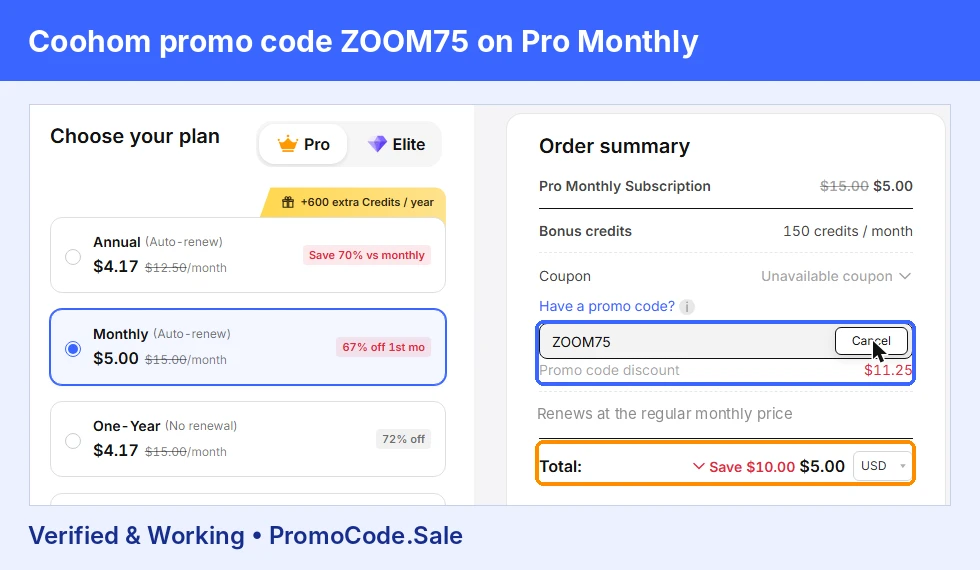
The result matched the yearly test: the code was accepted, and the discount line showed exactly 75% of the regular monthly price. The monthly plan renews at the regular monthly price, so set a reminder if you only need one month.
Coohom Prices and Plans
Coohom has four tiers. Basic is free, Pro is for individual designers, Elite is for advanced designers and studios, and Enterprise is a custom contract. Our code only covers Pro.
| Plan | What you get | Best for |
|---|---|---|
| Basic (free) | Floor-plan import once a month, standard low-detail models, 1K watermarked renders | Trying the editor |
| Pro | Unlimited floor-plan import, 100K+ premium models, your own 3D model uploads, unlimited 4K renders without watermark, real-time rendering, 360° walkthrough and 8K panorama, 200 AI credits a month | Freelance designers and homeowners with real projects |
| Elite | Everything in Pro plus construction drawings, CAD export, 3D presentation links, 8K to 32K renders, team collaboration and a team model library, 650 AI credits per seat a month | Studios that hand drawings to builders |
| Enterprise | White-label planner, cross-company sharing, ERP and CRM connections, account manager | Furniture brands and large firms |
Yearly billing on Pro adds 600 bonus AI credits, and yearly Elite adds 1,800 per seat. Prices are shown before tax, and the checkout lets you switch between USD, EUR and EGP.
Which Coohom Plan Should You Buy?
| Your situation | Our pick | Why |
|---|---|---|
| Redesigning one room or one apartment | Pro Monthly + Coohom promo code | Low cost, cancel after the project |
| Freelance interior designer showing clients renders | Pro Yearly + Coohom promo code | Unlimited 4K renders and panoramas for the whole year at the lowest price |
| Studio that sends drawings to contractors | Elite | Construction drawings and CAD export are Elite-only |
| Student or hobbyist | Basic, then Pro Monthly | Learn on the free plan first |
For most readers, Pro Yearly is the sweet spot: the jump from 1K watermarked renders to unlimited 4K renders is the main reason people pay for Coohom, and ZOOM75 makes that year far cheaper.
Does the Coohom Promo Code Work on Elite?
No. ZOOM75 is a Pro-only Coohom promo code. When we tried our Elite codes on Elite Yearly and Elite Monthly, the checkout answered “The coupon cannot be used” and “Please enter a valid promo code”.
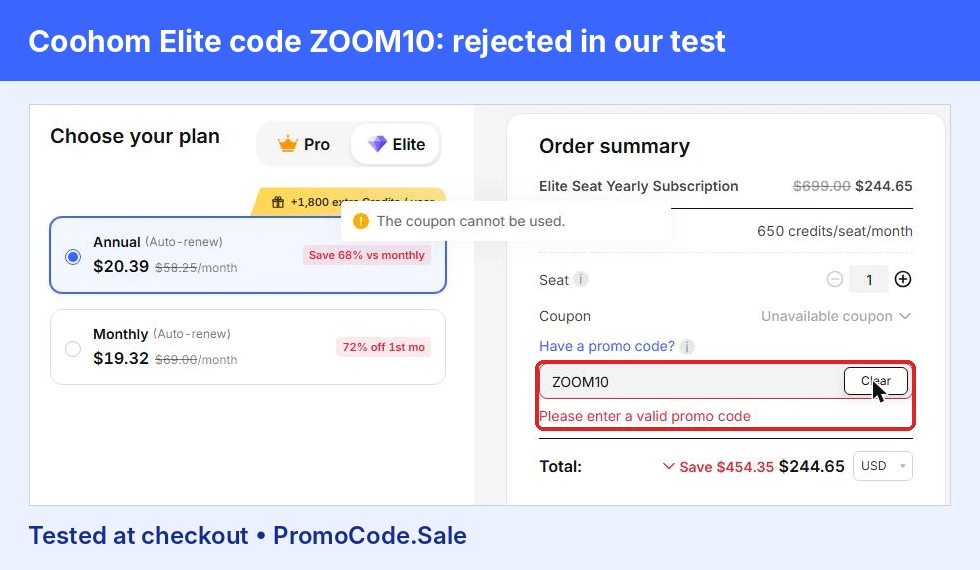
We have reported this to Coohom’s affiliate team. Until they reply, treat the Elite sale price as the best Elite deal. If you need construction drawings, buy Elite at the sale price; if you only need renders, Pro with the Coohom promo code is the better value.
Coohom Pro Features Worth Paying For
Before you use a discount, it helps to know what the paid plan actually unlocks. These are the Pro features that made the biggest difference in our hands-on time with the editor:
Floor plan to 3D in minutes
Upload a JPG or PDF floor plan and Coohom traces the walls, doors and windows into a 3D model. On the free plan you can do this once a month; Pro removes the limit, which matters as soon as you work on more than one home.
Unlimited 4K renders without watermark
Basic renders are 1K and watermarked, which is fine for testing but not for clients. Pro renders in 4K with accelerated speed and no watermark, so the images are ready for a portfolio, a listing or a client presentation.
Real-time rendering and panoramas
Real-time rendering shows lighting and materials as you move furniture. A 360° walkthrough and 8K panorama turn the whole home into one shareable link that clients can explore on a phone.
Premium models and your own uploads
Pro opens more than 100,000 premium models, with about 500 added every week, and lets you upload your own models in OBJ, FBX, SKP and other formats. Furniture sellers use this to place their exact products into a room.
Monthly AI credits
Pro includes 200 AI credits a month for AI renders, short AI space videos and styling ideas. Yearly billing adds 600 bonus credits on top.
Coohom Pro vs Free Basic
| Feature | Basic (free) | Pro |
|---|---|---|
| Floor-plan import | 1 per month | Unlimited |
| Model catalog | Standard, low-detail | 100K+ premium models |
| Render quality | 1K with watermark | Unlimited 4K, no watermark |
| Own 3D models | No | Yes (OBJ, FBX, SKP) |
| 360° walkthrough | No | Yes, with 8K panorama |
| AI credits | None | 200 per month |
If you only want to sketch a layout, Basic is enough. The moment you need images good enough to show someone else, Pro is the upgrade, and that is exactly where our 75% code applies.
Ways to Save More on Coohom
- Choose yearly billing. Yearly Pro is far cheaper per month than monthly, and it adds 600 bonus AI credits.
- Start on Basic. Build your first floor plan for free, then upgrade with ZOOM75 when you need 4K renders.
- Check the automatic coupon. Some accounts see a 15% account coupon. Compare it with ZOOM75 and keep the lower total.
- Watch the renewal. First-year prices renew at the regular price. Turn off auto-renew in your account if you do not plan to continue.
- Use the AI credits. Pro includes monthly AI credits for AI renders, AI space videos and styling ideas, so you need fewer paid add-ons.
About Coohom
Coohom is an all-in-one 3D home design platform used by interior designers, architects, furniture brands and homeowners. You can upload a 2D floor plan and turn it into a 3D project, furnish it from a catalog of more than 100,000 models, and render photo-realistic images, 360° panoramas and walkthrough videos in the browser. Coohom also has desktop apps for Windows and Mac and a mobile app.
The company is headquartered in New York with offices in London, Shanghai, Tokyo, Singapore and Seoul. Its business side sells a white-label room planner to furniture retailers, while the Pro and Elite memberships target individual designers and studios. Newer AI tools generate room layouts, styling ideas and short videos from your project.
Coohom Reviews on Trustpilot
At the time of our test, Coohom had a TrustScore of 3.3 out of 5 from about 200 reviews on Trustpilot, with most reviews at 5 stars.
Our advice: turn off auto-renew right after you buy if you only need the first term, and check which features your plan includes before you pay.
Coohom Pros and Cons
- Floor plan to 3D in minutes
- Unlimited 4K renders on Pro
- Huge model catalog
- Runs in the browser
- ZOOM75 takes 75% off Pro
- Plans auto-renew at the regular price
- Drawings and CAD export need Elite
- Support is slow, per reviews
- The code does not lower the Black Friday sale price
Is Coohom worth it? For anyone who presents interiors to clients, yes. The render quality and speed save hours compared with desktop rendering software, and at the discounted Pro price the subscription pays for itself with one client project.
Coohom Promo Code Not Working?
- You picked Elite. ZOOM75 only works on Pro. Switch the plan tab to Pro.
- The total did not change. A sale price is running. The checkout keeps the sale price while the sale is live.
- Typo or space. Type ZOOM75 in capitals, with no spaces before or after.
- Another coupon is active. Only one discount counts. Applying the code replaces the automatic account coupon.
- Not logged in. Coohom only shows the promo code field after you sign in.
If it still fails, tell us in the comments and we will retest the Coohom promo code right away.
Coohom Promo Code Terms and Conditions
- ZOOM75 gives 75% off the regular price of Coohom Pro memberships.
- Elite and Enterprise plans are not included.
- Works for new and existing Coohom users, according to Coohom’s affiliate team.
- One discount per order. The code does not combine with automatic account coupons or sale prices.
- The discount applies to the first billing term. Renewals are charged at the regular price.
- Coohom can change or end its offers at any time, as stated in its promotional terms.
Related Coohom Discount Codes
Coohom created five exclusive Pro codes for PromoCode.Sale. All five gave the same 75% discount line in our test, so use any of them if one is not accepted:
75% off Pro (main Coohom discount code)
75% off Pro (backup)
75% off Pro (backup)
75% off Pro (backup)
75% off Pro (backup)
Coohom vs Other Design Tools
| Tool | Main use | Choose it if |
|---|---|---|
| Coohom | 3D interior design and rendering | You design rooms and homes and need realistic renders |
| Pacdora | 3D packaging mockups and dielines | You design boxes and product packaging |
| Packify | AI packaging design | You want quick AI packaging concepts |
| Skylum | Photo editing (Luminar) | You retouch the renders or real photos of finished rooms |
More Coohom Savings on PromoCode.Sale
- All Coohom coupon codes: every tested code in one place.
- Design tools promo codes: discounts on packaging, 3D and creative software.
- Coohom’s official pricing page for the current plan list.
How We Test the Coohom Promo Code
Mahmoud Hassan, who runs PromoCode.Sale, tests every code at the real checkout before we publish it. For Coohom we logged in to a Coohom account, switched the pricing page to USD, opened the Pro Yearly, Pro Monthly, Elite Yearly and Elite Monthly order summaries, and applied each code one by one. We never place an order. We record the discount line and the total, take screenshots, and hide any personal data. We retest the codes every month and update this page.
Coohom Promo Code FAQ
What is the best Coohom promo code?
ZOOM75 is the best Coohom promo code we have. It is exclusive to PromoCode.Sale and gives 75% off the regular price of Coohom Pro, yearly or monthly.
How much does the Coohom promo code save?
On Pro Yearly the checkout showed a $112.50 discount on the $150 regular price, and on Pro Monthly an $11.25 discount on the $15 regular price.
Does the Coohom promo code work on Elite?
No. ZOOM75 is for Coohom Pro only. Our Elite codes were rejected at checkout, and we have reported this to Coohom.
Can I use the Coohom promo code during Black Friday?
Yes, the code is accepted, but while the Black Friday sale runs the checkout keeps the sale price ($50 for Pro Yearly), so the total does not drop further.
Is the Coohom promo code for new users only?
No. Coohom’s affiliate team told us the code has no new-user restriction, so existing accounts can use it too.
Where do I enter a Coohom discount code?
Log in, open Pricing, choose Pro and click Buy now. In the order summary click Have a promo code?, paste the code and click Apply.
Can I combine two Coohom coupons?
No. Coohom uses one discount per order. Applying ZOOM75 replaces any automatic account coupon.
Does Coohom have a free plan?
Yes. Coohom Basic is free, with limited floor-plan imports, standard models and 1K watermarked renders.
Does Coohom Pro renew automatically?
Yes. Pro renews at the regular price after the first term. You can cancel anytime from your account before the renewal date.

No Comments
Leave Comment