Shopping browser extensions promise to find coupons, cashback and price drops for you. Some genuinely help you save money online; others mostly collect affiliate commissions. This November 2026 guide ranks the browser extensions we would actually install, explains the rules Chrome introduced for coupon extensions in 2025, and shares what happened when coupon extensions ran during our own checkout tests this week.
Browser Extensions That Save Money: Quick Picks
Best for cashback: Rakuten and TopCashback. Best for price tracking: Keepa (Amazon) and Karma. Best for comparing prices: Capital One Shopping. Best for coupon codes: use with care, and always check the cart total yourself.
Our main lesson: browser extensions are useful assistants, not autopilots. In our tests the biggest savings came from the store’s own sale price and from verified codes, not from automatic code testing.
What Happened in Our Own Checkout Test
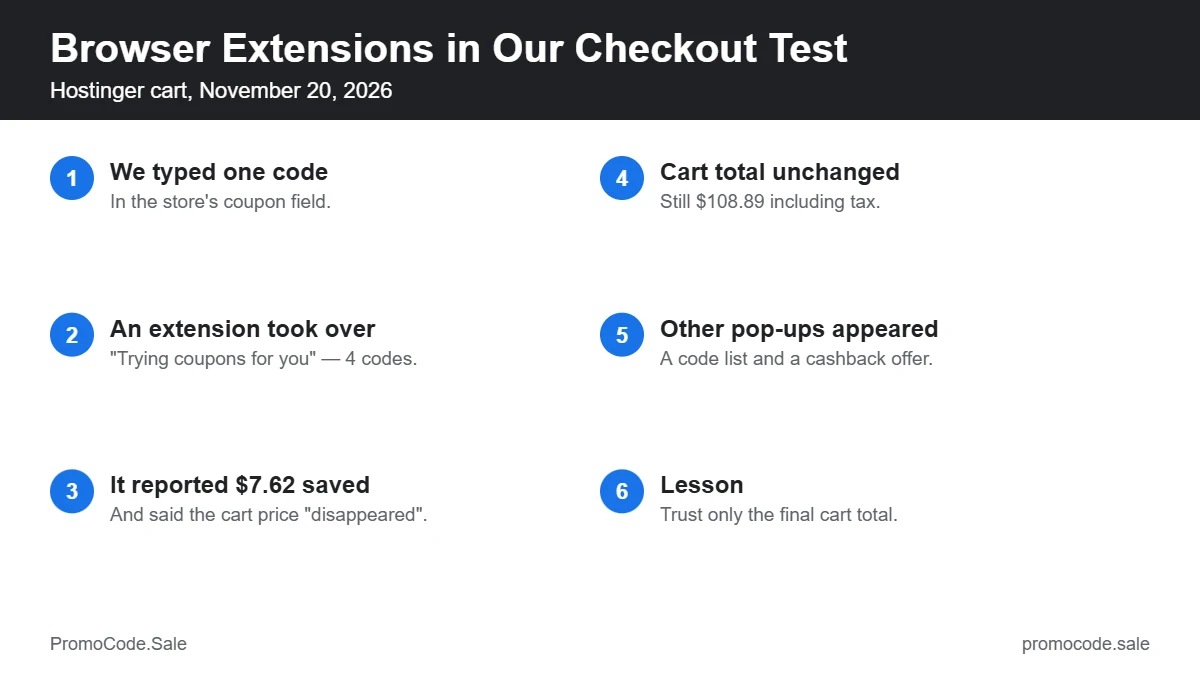
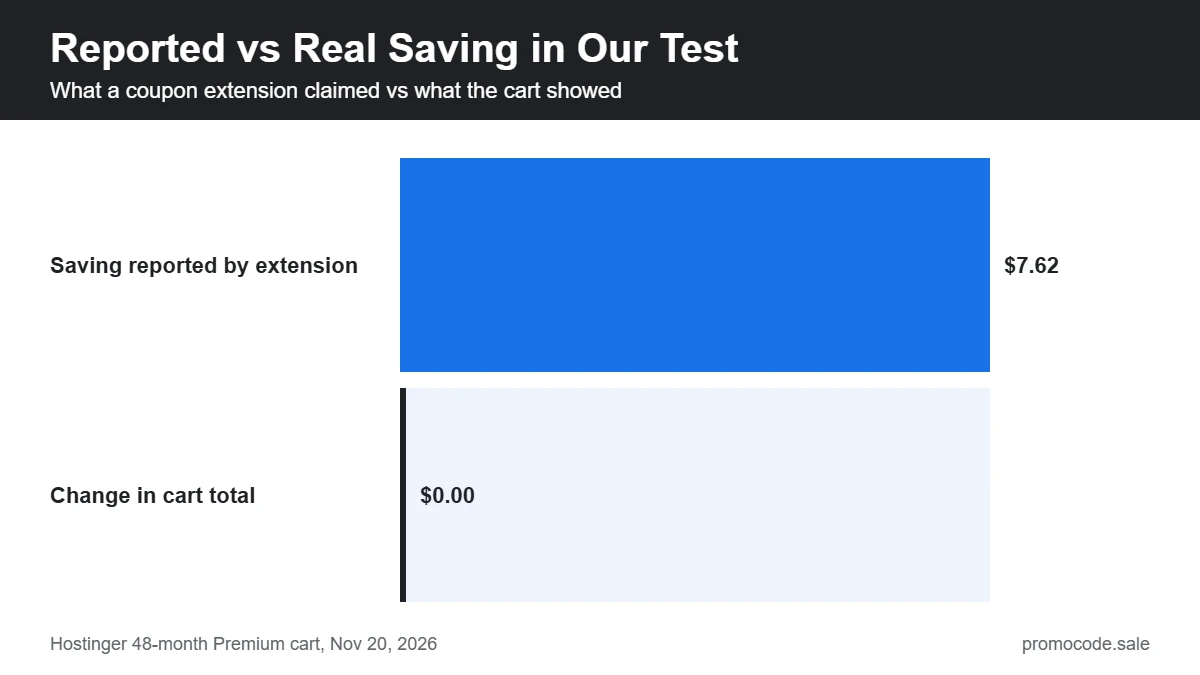
On November 20, 2026 we tested Hostinger’s cart for our Hostinger coupon code guide with several coupon browser extensions installed. As soon as we typed a code, one extension opened a “Trying coupons for you” window and tested four codes on its own. It then reported a saving of $7.62, but the cart total did not change and the extension itself said the cart price had “disappeared”. A second extension showed a list of “verified” codes, and a third offered cashback.
Takeaway: coupon extensions can interrupt checkout and report savings that are not in your cart. Close their pop-ups, apply the code you trust, and judge only by the final total on the store’s page.
How Coupon and Cashback Browser Extensions Make Money
Most free shopping browser extensions earn an affiliate commission when you buy. When you click their pop-up, they open the store through their own tracking link, and the store pays them a percentage of your order. Cashback extensions share part of that commission with you. Coupon extensions keep it in exchange for finding a code. That model is fine when the extension really saves you money, but it creates a conflict when the extension takes credit for a sale it did not influence, for example by replacing a creator’s or a website’s referral link at checkout.
Chrome’s 2025 Rules for Coupon Extensions
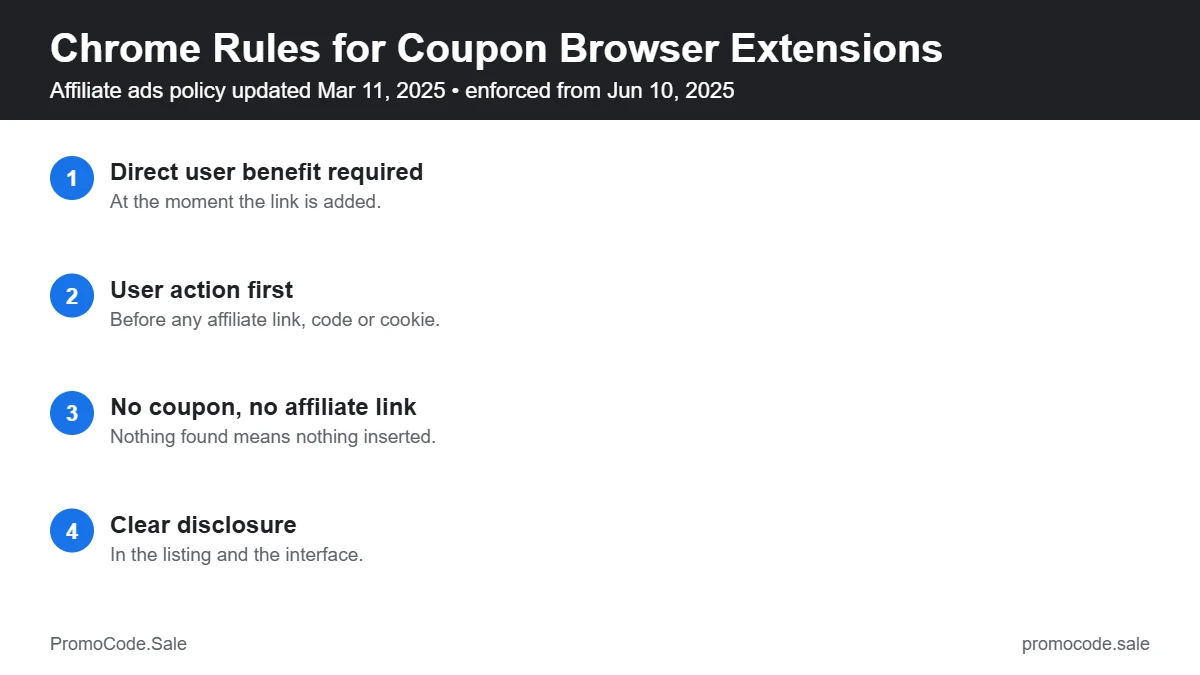
After an investigation published in December 2024 accused a popular coupon extension of overwriting creators’ affiliate links, Google updated the Chrome Web Store affiliate ads policy on March 11, 2025, with enforcement from June 10, 2025. Under the policy:
- affiliate links, codes or cookies may be added only when the extension gives the user a direct and transparent benefit at that moment;
- user action is required before any affiliate link, code or cookie is applied;
- a coupon extension must not insert an affiliate link if no coupon or discount is found;
- the affiliate programme must be disclosed in the store listing and the extension’s interface.
Read the policy update on the Chrome for Developers blog. These rules make browser extensions more transparent, but they do not guarantee that every code an extension shows will work.
1. Rakuten Cash Back Button
Best for: earning cashback at large US retailers. Rakuten’s extension reminds you when cashback is available and activates it when you click. Cashback is paid out periodically to PayPal or by check, depending on your country and account. It works best for US shoppers; coverage outside the US is more limited.
Watch out for: cashback is pending until the store confirms the order, and returns cancel it.
2. TopCashback
Best for: comparing cashback rates across many retailers in the US and UK. TopCashback’s extension shows the current rate on the store you visit. Rates change often, so check the rate on the day you buy and read each retailer’s terms, since some categories are excluded.
3. Capital One Shopping
Best for: comparing the price of the same product across stores and getting price-drop alerts. It is free and does not require a Capital One card. Rewards are paid as shopping credits redeemable for gift cards. Capital One settled a lawsuit brought by content creators over affiliate commissions in 2025 without admitting liability, so read its permissions before installing.
4. Keepa and CamelCamelCamel (Amazon)
Best for: Amazon price history. Both add a price-history chart to Amazon product pages so you can see whether today’s “deal” is really low or just back to an average price, and both offer price-drop alerts. For big purchases during Black Friday, a price-history chart is one of the most useful browser extensions you can install, because it shows whether a discount is genuine.
5. Karma
Best for: wish lists with price-drop and back-in-stock alerts across many fashion and home stores. Save items you want and wait for a notification instead of buying at full price. Karma also offers cashback at some stores.
6. ShopBack (Middle East and Asia)
Best for: cashback at stores in regions where US-focused services have little coverage. ShopBack operates in several Asian markets and lists partner stores by country. Check which stores are available in your country before relying on it, because coverage and rates vary.
7. Coupon-Code Extensions (Coupert, SimplyCodes, Honey and others)
These browser extensions test codes at checkout or show lists of codes. They can occasionally find a working code, but our own test showed the risk: automatic testing, pop-ups over the checkout, and reported savings that did not appear in the cart. PayPal’s Honey extension has also faced litigation from creators over affiliate commissions; the cases are allegations and were still before the courts in 2026, and several large affiliate networks removed Honey from their programmes in January 2026.
If you keep a coupon extension, switch off automatic code testing where possible, and never trust a reported saving until you see it in the order total.
8. uBlock Origin (Lite) for Cleaner Shopping
Not a coupon tool, but it makes shopping safer by blocking many ads, trackers and pop-ups. On Chrome, Google’s move to Manifest V3 means the original uBlock Origin is no longer supported; the Chrome version is uBlock Origin Lite. Firefox still supports the full uBlock Origin. Fewer ads also means fewer fake “deal” banners competing for your clicks.
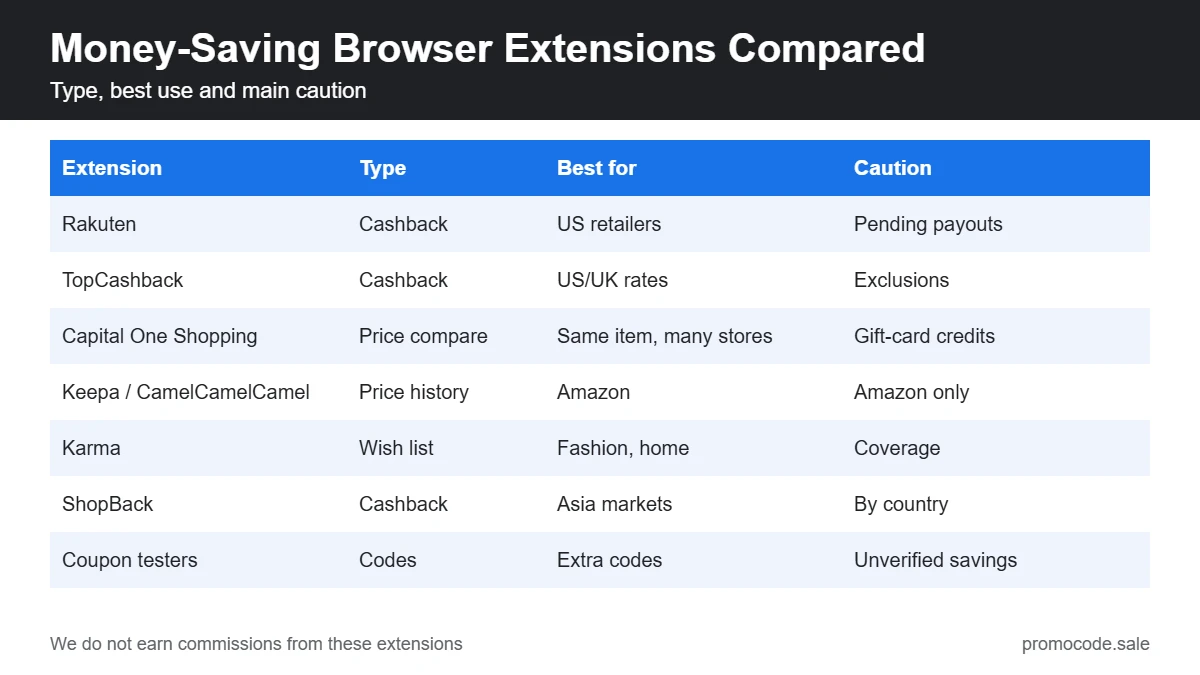
Browser Extensions Compared
| Extension | Type | Best for | Main caution |
|---|---|---|---|
| Rakuten | Cashback | US retailers | Pending cashback, returns cancel it |
| TopCashback | Cashback | US/UK rate comparison | Rates and exclusions change |
| Capital One Shopping | Price comparison | Same product, many stores | Credits only for gift cards |
| Keepa / CamelCamelCamel | Price history | Amazon deals | Amazon only |
| Karma | Wish list alerts | Fashion and home | Store coverage varies |
| ShopBack | Cashback | Asia markets | Country-specific stores |
| Coupon-code extensions | Code testing | Occasional extra codes | Pop-ups, unverified savings |
| uBlock Origin Lite | Content blocker | Cleaner, safer browsing | Some sites ask you to disable it |
How to Choose Safely
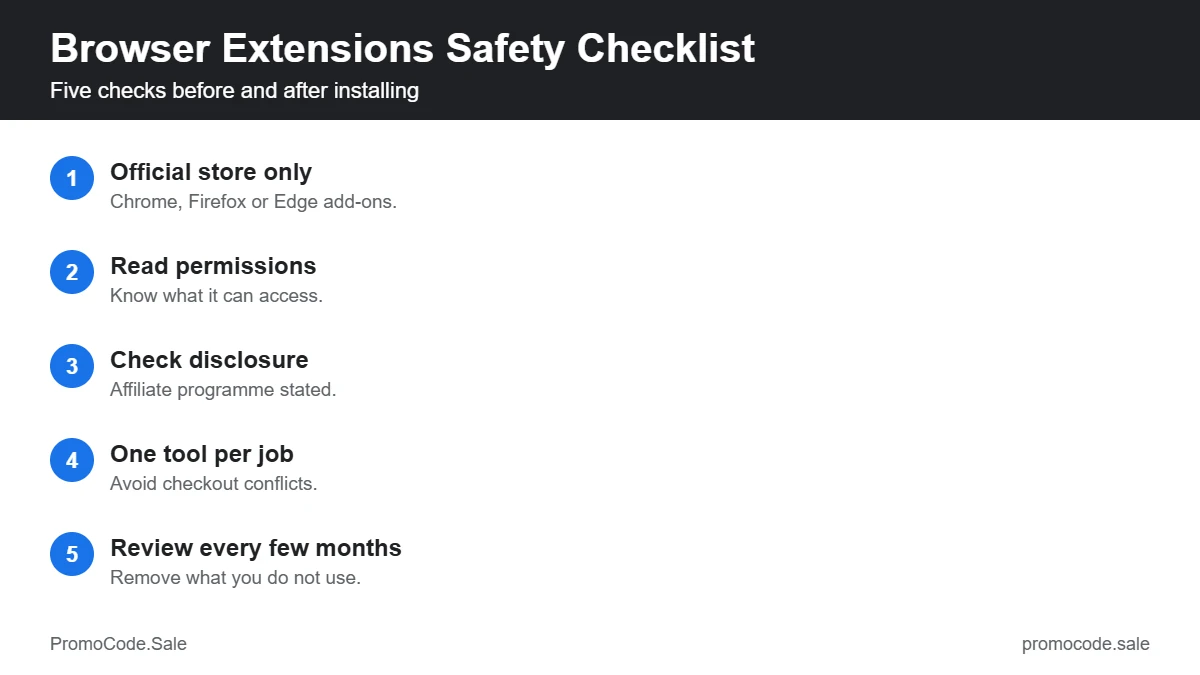
- Install only from the official store (Chrome Web Store, Firefox Add-ons or Edge Add-ons).
- Read the permissions. “Read and change all your data on all websites” is normal for shopping tools but means you must trust the company.
- Check the disclosure. Since 2025, Chrome requires affiliate programmes to be disclosed.
- Use one tool per job. One cashback extension and one price tracker are enough; several coupon tools fight each other at checkout.
- Review installed browser extensions every few months and remove those you no longer use.
Do Browser Extensions Really Save Money Online?
Sometimes. Cashback extensions return a real percentage on qualifying orders, and price trackers stop you from buying at a fake “sale” price. Coupon-code extensions are the least reliable: many codes they test are expired or not valid for your cart, and some savings they report do not reach your order. To save money online consistently, combine three habits: buy during real sales, use verified codes from a source that tests them, and track prices for big purchases.
Black Friday 2026: A Smarter Way to Use Them
Black Friday falls on November 27, 2026 and Cyber Monday on November 30. This is when shopping tools are most active and most noisy. A simple plan works better than installing everything:
- Two weeks before, add the products you want to a price tracker or wish list so you know their normal price.
- On the day, open the store directly or through a source you trust and compare the sale price with the price history.
- Activate cashback only if the rate is shown and the store is eligible.
- Apply one tested code; ignore pop-ups that promise to try dozens of codes.
- Screenshot the final total before paying, in case cashback or a promised discount does not arrive.
Cashback vs Coupon: Which Saves More?
Take a $200 order. A 10% coupon cuts the price to $180 immediately. A 5% cashback offer returns $10 later, after the store confirms the order, which can take weeks or months. If both are allowed together, you pay $180 and later get back about $9 (5% of the discounted total). The coupon is usually the bigger and more certain saving, while cashback is a bonus on top. Some stores, however, cancel cashback when a code from an unapproved source is used, so read the cashback terms before combining them.
Signs an Extension Is Not Worth Keeping
- It opens pop-ups on almost every page, not only at checkout.
- It reports savings that never appear in your order total.
- It redirects you through new links when you did not click anything.
- It asks for new permissions after an update without explaining why.
- Its developer or owner changed and reviews suddenly turned negative.
Any one of these is a good reason to remove it. Fewer, better tools keep your browser faster and your checkout cleaner.
A Simple Saving Toolkit
One cashback tool
Pick the service with the best coverage in your country and stick to it so your balance grows in one place.
One price tracker
Keepa or CamelCamelCamel for Amazon; a wish-list tool for fashion and home stores.
One content blocker
uBlock Origin Lite on Chrome or uBlock Origin on Firefox to reduce ads and pop-ups.
A trusted code source
A website that tests codes in a real cart before publishing them.
How Stores Treat Coupon Codes
Stores decide which codes are valid, for which products and for how long. Many publish codes for specific partners or campaigns and disable them when they leak. That is why automatic testers often try a long list of expired codes: the list is cheap to collect but rarely checked. A code that worked for one country, one product category or one customer type may fail for you. Reading the terms next to a code, or using a source that states where and when it tested the code, saves time at checkout.
Tips for Shoppers in Egypt and the Gulf
Many US cashback services have limited coverage for stores in Egypt, Saudi Arabia and the UAE, and some payouts require a US PayPal account. For local stores, the most reliable savings usually come from the store’s own app offers and from tested codes. On PromoCode.Sale we test codes in the cart before publishing them, for example our Noon promo code guide for the Gulf and our travel guides for flights and hotels.
Affiliate Links, Creators and Fairness
When you click a link from a creator or a deals website, that publisher may earn a commission at no extra cost to you. Some browser extensions have been accused of replacing those links with their own at checkout, even when they did not find a discount. Chrome’s 2025 rules aim to stop that. If you want the creator or site that helped you to be credited, close coupon pop-ups at checkout unless they show you a real saving.
Privacy and Security Checklist
- Use extensions from known companies with a clear privacy policy.
- Avoid extensions that ask for permissions unrelated to shopping.
- Remove extensions that change owner or start showing unexpected ads.
- Keep your browser updated so extension security fixes apply.
- Do not enter card details in pop-ups opened by an extension; pay only on the store’s own checkout page.
Mobile Apps vs Desktop Extensions
Most shopping browser extensions work only on desktop browsers. On phones, the same companies usually offer a separate app or a mobile browser with built-in features. Cashback apps generally ask you to start your shopping session inside their app so the purchase can be tracked, which is less convenient than an extension. If you mostly shop in store apps, such as many Gulf shoppers do with marketplace and fashion apps, cashback and coupon tools may not track your order at all. In that case, applying a tested code inside the store app is the simplest way to save.
Should You Trust ‘Verified’ Labels?
Many coupon tools label codes as “verified” or “worked recently”. Those labels can mean very different things: a code may have worked once for one user, in one country, on one product. Look for specifics instead of badges: the date of the test, the cart value, the country and whether the discount appeared in the total. If a label gives none of those details, treat the code as a guess and keep the store’s sale price as your baseline.
Our Verdict
The best browser extensions for saving are the quiet ones: a cashback tool you activate on purpose, a price tracker that shows real history, and a content blocker that removes noise. Coupon-testing extensions can help occasionally, but our own test this week showed why you should judge them by the final cart total, not by their pop-ups. Combine a few reliable tools with tested codes and genuine sales, and you will save money online without giving away control of your checkout.
How We Researched This Guide
We rebuilt this guide on November 20, 2026. We reviewed the Chrome Web Store affiliate policy update of March 2025, recent reporting on coupon-extension litigation and affiliate-network decisions, and each extension’s public product pages. We also recorded what coupon browser extensions did during our own Hostinger cart test on the same day. We do not earn commissions from the extensions listed here.
More Ways to Save
- Hostinger coupon code (tested in the cart)
- Noon promo code guide
- Expedia savings guide
- How to save money on Temu
Browser Extensions FAQ
Are coupon browser extensions safe?
Extensions from known companies installed from official stores are generally safe, but they can read data on the sites you visit. Check permissions and remove ones you do not use.
Do coupon extensions actually find working codes?
Sometimes. In our own November 2026 test, a coupon extension reported a $7.62 saving that did not appear in the cart total.
What changed for coupon extensions in Chrome?
Since June 10, 2025, Chrome requires a direct user benefit and user action before an extension adds affiliate links, codes or cookies.
Which browser extensions are best for cashback?
Rakuten and TopCashback for US and UK stores; ShopBack in several Asian markets.
How do I check if an Amazon deal is real?
Use a price-history extension such as Keepa or CamelCamelCamel to compare today’s price with past prices.
Can I use several coupon extensions together?
It is better not to. They compete at checkout, open pop-ups and can replace each other’s links.
Is uBlock Origin still available on Chrome?
On Chrome the supported version is uBlock Origin Lite; the full uBlock Origin remains available on Firefox.
Do browser extensions work on mobile?
Most shopping extensions are desktop-only; some companies offer separate mobile apps.
What is the most reliable way to save money online?
Buy during genuine sales, use codes that were tested in a real cart, and track prices before big purchases.

No Comments
Leave Comment