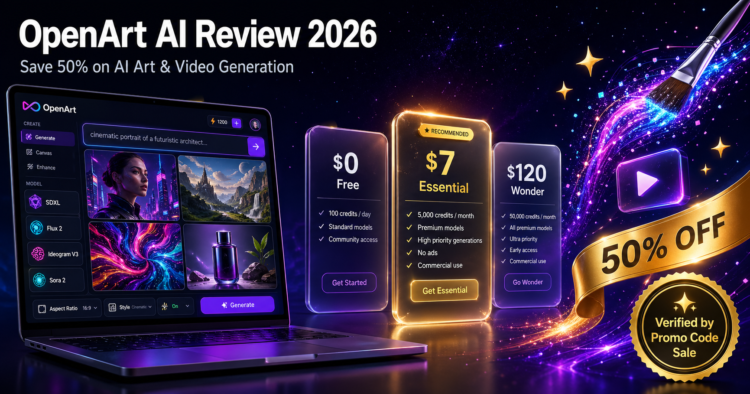
🎨 Verified Review · April 2026 · Updated Monthly
OpenArt AI Review 2026 — The Smartest Way to Save 50% on AI Art & Video
A complete shopper-focused review of OpenArt AI — pricing, plans, free credit hacks, and the exact stacking strategy that cuts your subscription cost in half. Curated by Promo Code Sale.
- ⚡ 100+ AI models in one platform
- 🎬 Image · Video · Story creation
- 💸 Up to 50% off annual billing
- 🆓 Free plan with 90 trial credits
- 🔒 Private creations on paid tiers
What Is OpenArt AI? (And Why It Matters in 2026)
OpenArt AI is a browser-based generative-AI creative suite that bundles more than 100 premium image, video, and audio models under a single credit-based subscription. Where most competitors lock you into one engine — Midjourney runs on its own model, Adobe Firefly on Adobe’s — OpenArt gives you SDXL, Flux 2, Ideogram V3, Sora 2, Kling 2.6, Grok Imagine, Z-Image Turbo, and dozens more in the same workspace, switchable in two clicks.
For shoppers, that’s the headline savings story: one subscription replaces three to five. Instead of paying separately for Midjourney + Runway + ElevenLabs + a stock photo subscription, OpenArt covers most of that ground from $7/month on annual billing.
Who OpenArt AI is built for
- Beginners and hobbyists — the Magic Prompt feature writes optimized prompts for you, removing the prompt-engineering learning curve.
- Content creators & bloggers — generate featured images, social posts, and short videos at the same workspace.
- Freelance designers — LoRA training for consistent brand characters, ControlNet for precision, and 4096 × 4096 output resolution.
- Marketing teams — the Team plan pools credits across seats with role management and shared asset libraries.
- Studios & agencies — the Wonder plan delivers 106,000 credits and unlimited use of select models for high-volume production.
What You Actually Get with OpenArt AI
The feature surface is broad — too broad to absorb at once. Here’s the breakdown grouped by what you’ll actually use, not how the marketing page presents it.
Text-to-Image
Generate from any prompt across 100+ models. Magic Prompt rewrites your input for stronger results — beginners see noticeably better outputs in the first 10 minutes.
AI Video
Sora 2, Kling 2.6, and Grok Imagine for short-form video. Generation typically takes 30 seconds to a few minutes per clip; higher tiers get priority queue.
One-Click Story Creation
Build illustrated stories with consistent characters across multiple scenes — included on every paid plan, capped by tier (up to 150 stories on Wonder).
Consistent Characters
Train your own characters once, reuse across every generation. Essential includes ~13 personalized models; Wonder allows 353.
LoRA Training
Fine-tune models on your own style, brand, or product photography. Basic LoRA on Starter; unlimited on Pro/Wonder.
Inpaint & Outpaint
Remove objects, change backgrounds, expand canvas — replaces the basic Photoshop work most creators outsource.
Upscale to 4K
4096 × 4096 maximum resolution on higher tiers. Enough for print-ready outputs and large social banners.
API & Pipeline Builder
Automate generation in your own apps and workflows. Available on Pro tier and above.
OpenArt AI Pricing 2026 — All Plans Compared
OpenArt uses a credit-based subscription model: every plan grants a monthly credit allowance, and each generation deducts credits based on the model and resolution. Subscription credits reset monthly and do not roll over — it’s a “use it or lose it” model.
| Plan | Annual Price | Monthly Credits | Parallel Gens | Best For |
|---|---|---|---|---|
| Free | $0 | 40 trial + 50 Discord bonus | 4 | Trying the platform |
| Essential | $7/mo | 4,000 | 8 | Hobbyists · bloggers · solo creators |
| Advanced | ~$12/mo | 12,000 | 16 | Freelancers · social media managers |
| Infinite Most popular | ~$28/mo | ~30,000 | 32 | Pro creators · marketing teams |
| Wonder | $120/mo | 106,000 | 32 | Studios · agencies · high volume |
| Team | $17.50 / seat / mo | 12,000 / seat (pooled) | — | Collaborative workspaces |
Add-on credit packs are sold at $15 per 5,000 credits as a one-time top-up if you run out mid-month. Wonder subscribers get 10% off these packs.
How to Save the Maximum on OpenArt AI
Most users overpay for OpenArt because they default to monthly billing and ignore the free credit sources. Here’s the exact stacking order we recommend at Promo Code Sale.
-
1
Start on the free plan and claim 90 credits
Sign up — you get 40 one-time trial credits automatically. Then join the official OpenArt Discord to unlock 50 bonus credits. That’s 90 credits for $0 — enough to genuinely test the platform across 4–6 different models before spending anything.
-
2
Switch to annual billing — instantly save 50%
This is the biggest discount on the platform. Annual billing cuts every paid plan in half. Essential drops from $14/mo → $7/mo. Wonder drops from $240/mo → $120/mo. If you plan to use OpenArt for more than 2 months, monthly billing is overpaying.
-
3
Pick the cheapest plan that meets your real volume
The most expensive mistake is overestimating usage. 4,000 credits/month is enough for most solo creators. Upgrade only when you genuinely run out two months in a row — credits don’t roll over, so an oversized plan is wasted money.
-
4
Use add-on credit packs instead of upgrading
If you spike once or twice a year, a one-off $15 pack of 5,000 credits is almost always cheaper than upgrading a tier permanently. Stay on the lower plan, top up on demand.
-
5
Bookmark our AI Tools coupon hub
Promotional codes on OpenArt rotate. We monitor the platform and publish working codes at promocode.sale/coupon-category/ai-tools-productivity/ — verified before they go live, removed the moment they expire.
Which OpenArt AI Plan Is Right for You?
Match your honest creative volume to the right plan — overestimating is the #1 way users overspend on AI tools.
Free Plan
For: testing the platform, casual curiosity, students.
- 40 trial + 50 Discord credits
- 4 parallel generations
- All creations are public
- Access to most premium models
Verdict: enough for ~10–20 quality images. Fine starting point.
Essential (annual)
For: bloggers, hobbyists, social media managers with light volume.
- 4,000 credits/month
- Private creations (huge upgrade)
- 8 parallel generations
- Full 100+ premium model library
- ~13 personalized models
Best value entry point. Where most readers should start.
Infinite (annual)
For: pro creators, marketing teams, freelance designers.
- ~30,000 credits/month
- 32 parallel generations
- Up to 80 personalized models
- Priority generation speed
- Best balance of cost & capacity
The sweet spot for full-time creative work.
Wonder (annual)
For: studios, agencies, enterprise creative production.
- 106,000 credits/month
- Unlimited Grok Imagine + Z-Image Turbo
- 10% off add-on credit packs
- Up to 60% model-level discounts
- Priority support
Stops being credit-counting territory. For pure volume.
OpenArt AI vs Midjourney vs Adobe Firefly — Honest Comparison
Where OpenArt sits relative to the two most common alternatives. We’re focusing on the criteria that affect savings, not feature counts on a marketing page.
| Criterion | OpenArt AI | Midjourney | Adobe Firefly |
|---|---|---|---|
| Entry price (annual) | $7/mo | $8/mo (Basic) | $9.99/mo standalone |
| Number of AI models | ✅ 100+ models | 1 (proprietary) | 1 (proprietary) |
| Video generation | ✅ Sora 2, Kling 2.6, Grok Imagine | ❌ | ⚠️ Limited |
| LoRA training | ✅ On Starter+ | ❌ | ❌ |
| API access | ✅ Pro tier | ❌ | ⚠️ Enterprise only |
| Browser-based, no install | ✅ | ⚠️ Discord-based | ✅ |
| Free trial credits | ✅ 90 (with Discord) | ❌ No free tier | ⚠️ Limited |
| Beginner friendliness | ✅ Magic Prompt + course | ⚠️ Steep learning | ✅ Familiar Adobe UI |
| Privacy on free tier | ❌ Public | ❌ Public on basic | ✅ Private |
The verdict for shoppers: if you want one tool to replace several (image + video + story), OpenArt is the clear value leader. If you only want gallery-grade artistic stills, Midjourney may produce richer outputs at a similar price. If you’re already paying for Adobe Creative Cloud, Firefly comes bundled and saves nothing extra to add.
What We Like & Where OpenArt AI Falls Short
✅ What we like
- One platform replaces three or four. Image, video, audio, and story tools under one credit pool.
- Annual billing cuts cost in half — the biggest single saving on the platform.
- Magic Prompt dramatically lowers the prompt-engineering learning curve for beginners.
- Privacy on paid plans — all generations stay private, which matters for client work.
- 100+ models including Sora 2, Kling 2.6, Flux 2, Ideogram V3, and SDXL.
- Active development — new models added throughout 2025–2026.
- Built-in 101 course inside the dashboard — rare on competing tools.
⚠️ Where it falls short
- Free tier is tight. 40 one-time credits + 50 Discord bonus is enough to test, not to use long-term.
- Credits don’t roll over. Unused monthly credits expire — pick the right tier carefully.
- Credit transparency could be clearer. One credit ≠ one image; some premium models burn 5–10x more.
- Free tier creations are public. Privacy starts at the Essential plan.
- For pure artistic stills, Midjourney still has a slight edge in painterly outputs.
Real Use Cases — Where OpenArt AI Pays for Itself
Specific examples our readers from the Design and AI Tools & Productivity categories ask about most often:
Bloggers & Content Sites
Generate featured images, in-article illustrations, and Pinterest-ready vertical graphics. Essential plan covers ~50 standard images per day — enough for most editorial calendars.
Social Media Managers
Run consistent character/brand assets across Instagram, TikTok, and LinkedIn. LoRA training keeps your brand persona on-model across thousands of posts.
E-commerce Stores
Replace expensive product photography for early-stage SKUs. Inpainting cleans backgrounds; upscaling exports print-ready resolution.
Indie Filmmakers & YouTubers
Storyboard scenes with Sora 2, generate B-roll with Kling 2.6, and ship intro animations without leaving the workspace.
Freelance Designers
Pitch concepts to clients in hours, not days. ControlNet matches client-supplied references; outpainting expands compositions.
Educators & Course Creators
Build illustrated explainers and consistent character-driven story lessons. One-Click Story is purpose-built for this.
How to Start on OpenArt AI the Smart Way
Six steps from $0 to your first generations — optimized for shoppers who want maximum value, not flashy commitments.
-
1
Sign up free
Open OpenArt AI and create an account. You get 40 trial credits instantly.
-
2
Join the Discord
Claim your 50 bonus credits. Total free credits: 90.
-
3
Test 4–6 different models
Use Magic Prompt to compare Flux 2, Ideogram V3, SDXL, and one video model. Pick the ones that match your style.
-
4
Estimate your real monthly volume
How many images per week did you actually want? Multiply by 4 — that’s your monthly demand.
-
5
Switch to annual billing
Pick the smallest plan that covers your demand. Annual = 50% off automatically. Don’t pay monthly unless you’re 100% short-term.
-
6
Bookmark our AI Tools deals page
Codes, sales, and lifetime offers rotate at promocode.sale/coupon-category/ai-tools-productivity/.
OpenArt AI — Frequently Asked Questions
How much does OpenArt AI cost in 2026?
OpenArt AI starts at $7 per month on the Essential plan with annual billing. Other tiers include Advanced (~$12/mo), Infinite (~$28/mo), Wonder ($120/mo annual with 106,000 credits), and a Team plan at $17.50 per seat annual. A free plan gives 40 one-time trial credits plus 50 bonus credits for joining the Discord.
Is OpenArt AI free to use?
Yes. The free plan offers 40 one-time trial credits and 4 parallel generations. Joining the official OpenArt Discord adds another 50 bonus credits. Free-tier creations are public; private generations require a paid plan.
What’s the biggest discount on OpenArt AI?
Annual billing applies a flat 50% off across every paid plan — the largest single saving on the platform. Promotional codes from coupon publishers can stack on top of that. Bookmark our AI Tools & Productivity hub for active campaigns.
How do OpenArt credits actually work?
Every action — image, video, upscaling, training — consumes credits. One credit doesn’t equal one image: standard SDXL outputs cost a few credits, while video and premium models like Sora 2 burn 5–10x more. Subscription credits reset monthly and don’t roll over. Add-on credit packs cost $15 per 5,000 credits.
Which OpenArt plan is best for beginners?
The Essential plan at $7/month annual — it includes 4,000 credits, private creations, 8 parallel generations, and full access to all 100+ premium models. For pure exploration, start free first; upgrade only when you regularly hit the trial-credit ceiling.
Does OpenArt AI offer commercial usage rights?
Most paid plans include commercial usage rights for generated images, but exact terms vary by tier. If you’re using outputs for client work, advertising, or product design, confirm the commercial-rights section in your plan details before publishing.
OpenArt AI vs Midjourney — which should I pick?
OpenArt if you want a multi-model creative suite (image + video + story) at a lower entry price. Midjourney if you only want artistic stills and prefer a single highly polished engine. Pricing is comparable on the entry tiers, but OpenArt covers far more ground per dollar.
Can I cancel my OpenArt subscription anytime?
Yes — you can cancel anytime from the billing dashboard. Annual plans don’t pro-rate refunds for unused months: you keep access until the year ends, then the subscription stops renewing.
Where can I find more AI tool and design deals?
Promo Code Sale curates verified deals across two relevant hubs: AI Tools & Productivity for AI subscriptions, and Design for creative software. Both pages are updated continuously, with codes tested before publication and removed the moment they expire.
Ready to Save 50% on OpenArt AI?
OpenArt AI bundles the most complete generative-AI creative suite in 2026 — and annual billing cuts its real cost in half. Combined with 90 free trial credits and verified deals tracked by Promo Code Sale, it’s the smartest entry point into AI image, video, and story creation.
No Comments
Leave Comment